はじめに
Pythonの標準ライブラリhttp.serverを使い、URLのパスに応じて表示するページや処理を切り替えるルーティングの実装方法を学びます。また、Pythonのコード内にHTMLを直接記述するのではなく、外部のHTMLファイルを読み込んで表示する方法や、CSSファイルを読み込んでWebページのデザインを整える方法についても解説します。さらに、Webアプリケーションに欠かせないGETリクエストとPOSTリクエストの違いを理解し、それぞれを適切に処理する方法を学びながら、より実践的なWebアプリケーションを作成していきます。
ルーティングとHTML連携
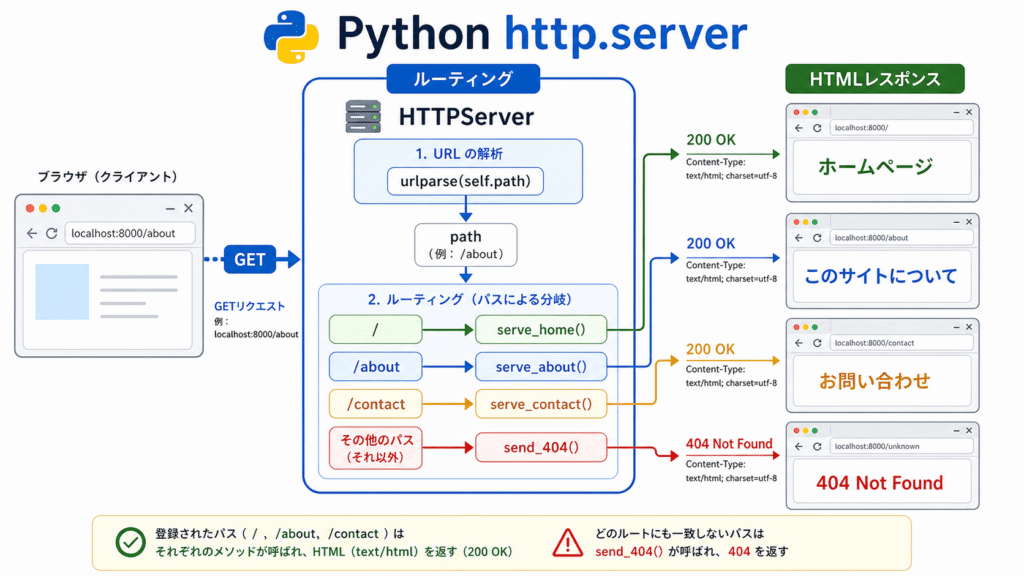
実際のWebアプリケーションでは、「/about」にアクセスしたら会社概要ページ、「/contact」にアクセスしたらお問い合わせページ のように、URLごとに異なる内容を表示する必要があります。この振り分け機能がルーティングです。
また、動的なWebページを作成するには、Pythonコード内にHTMLを直接記述するのではなく、外部のHTMLファイルを読み込む方法が一般的です。これにより、デザイン(HTML/CSS)とロジック(Python)を分離でき、保守性が向上します。
ルーティングの実装
前回のdo_GETメソッドでは、self.pathを使ってパスを判定し、処理を分岐させました。これをより体系化したものがルーティングです。
基本的なルーティングの実装
次のコードはURL のパスに応じて 表示するページを切り替えるだけの処理 です。’/’ ならホーム、’/about’ なら About、’/contact’ なら Contact、それ以外は 404 を返します。つまり パスごとに対応するメソッドを呼び分ける簡単なルーティングです。
from http.server import HTTPServer, BaseHTTPRequestHandler
from urllib.parse import urlparse

class MyHandler(BaseHTTPRequestHandler):
    def do_GET(self):
        parsed_url = urlparse(self.path)
        path = parsed_url.path

        # ルーティング処理
        if path == '/':
            self.serve_home()
        elif path == '/about':
            self.serve_about()
        elif path == '/contact':
            self.serve_contact()
        else:
            self.send_404()

    def serve_home(self):
        self.send_response(200)
        self.send_header('Content-type', 'text/html; charset=utf-8')
        self.end_headers()
        self.wfile.write('<h1>ホームページ</h1>'.encode('utf-8'))

    def serve_about(self):
        self.send_response(200)
        self.send_header('Content-type', 'text/html; charset=utf-8')
        self.end_headers()
        self.wfile.write('<h1>このサイトについて</h1>'.encode('utf-8'))

    def serve_contact(self):
        self.send_response(200)
        self.send_header('Content-type', 'text/html; charset=utf-8')
        self.end_headers()
        self.wfile.write('<h1>お問い合わせ</h1>'.encode('utf-8'))

    def send_404(self):
        self.send_response(404)
        self.send_header('Content-type', 'text/html; charset=utf-8')
        self.end_headers()
        self.wfile.write('<h1>404 Not Found</h1>'.encode('utf-8'))
HTMLファイルとの連携
次に、外部のHTMLファイルを読み込んで表示する方法を学びます。
ディレクトリ構造
まず、以下のようなディレクトリ構造を作成します。
my_web_app/
├── server.py          # Pythonサーバーコード
├── templates/         # HTMLテンプレートディレクトリ
│   ├── index.html
│   ├── about.html
│   └── contact.html
└── static/           # 静的ファイル(CSS、画像など)
    └── style.css
HTMLテンプレートの作成
templates/index.html ファイルを作成します。
html
<meta charset="UTF-8">
<meta name="viewport" content="width=device-width, initial-scale=1.0">
<title>ホームページ</title>
<link rel="stylesheet" href="/static/style.css">

<nav>
    <a href="/">ホーム</a>
    <a href="/about">About</a>
    <a href="/contact">Contact</a>
</nav>

<main>
    <h1>ようこそ!</h1>
    <p>これはPythonのWebサーバーで表示されているページです。</p>
</main>
HTMLファイルを読み込むサーバーの実装
from http.server import HTTPServer, BaseHTTPRequestHandler
from urllib.parse import urlparse
import os

class MyHandler(BaseHTTPRequestHandler):
    def do_GET(self):
        parsed_url = urlparse(self.path)
        path = parsed_url.path

        # 静的ファイル(CSSなど)の処理
        if path.startswith('/static/'):
            self.serve_static(path)
            return

        # ルーティング処理
        if path == '/':
            self.render_template('index.html')
        elif path == '/about':
            self.render_template('about.html')
        elif path == '/contact':
            self.render_template('contact.html')
        else:
            self.send_404()

    def render_template(self, filename):
        """テンプレートファイルを読み込んで表示"""
        try:
            # templatesディレクトリからファイルを読み込む
            filepath = os.path.join('templates', filename)
            with open(filepath, 'r', encoding='utf-8') as f:
                content = f.read()

            self.send_response(200)
            self.send_header('Content-type', 'text/html; charset=utf-8')
            self.end_headers()
            self.wfile.write(content.encode('utf-8'))

        except FileNotFoundError:
            self.send_404()

    def serve_static(self, path):
        """静的ファイル(CSS、画像など)を配信"""
        try:
            # /static/ を取り除いたパス
            filepath = path[1:]  # 先頭の / を削除
            with open(filepath, 'rb') as f:
                content = f.read()

            # 拡張子に基づいてContent-Typeを設定
            if path.endswith('.css'):
                content_type = 'text/css; charset=utf-8'
            elif path.endswith('.js'):
                content_type = 'application/javascript; charset=utf-8'
            elif path.endswith('.png'):
                content_type = 'image/png'
            elif path.endswith('.jpg') or path.endswith('.jpeg'):
                content_type = 'image/jpeg'
            else:
                content_type = 'application/octet-stream'

            self.send_response(200)
            self.send_header('Content-type', content_type)
            self.end_headers()
            self.wfile.write(content)

        except FileNotFoundError:
            self.send_404()

    def send_404(self):
        self.send_response(404)
        self.send_header('Content-type', 'text/html; charset=utf-8')
        self.end_headers()
        self.wfile.write('<h1>404 Not Found</h1>'.encode('utf-8'))

def run():
    server_address = ('', 8000)
    httpd = HTTPServer(server_address, MyHandler)
    print('🚀 サーバーを起動しました: http://localhost:8000')
    print('📁 テンプレートディレクトリ: templates/')
    print('📁 静的ファイルディレクトリ: static/')
    httpd.serve_forever()

if __name__ == '__main__':
    run()
CSSファイルの作成
static/style.css ファイルを作成します。
/* リセットと基本設定 */
* {
    margin: 0;
    padding: 0;
    box-sizing: border-box;
}

body {
    font-family: 'Segoe UI', Tahoma, Geneva, Verdana, sans-serif;
    line-height: 1.6;
    color: #333;
    background-color: #f4f4f4;
}

/* ナビゲーション */
nav {
    background-color: #2c3e50;
    padding: 1rem 2rem;
    box-shadow: 0 2px 4px rgba(0,0,0,0.1);
}

nav a {
    color: white;
    text-decoration: none;
    margin-right: 2rem;
    font-weight: 500;
    transition: color 0.3s;
}

nav a:hover {
    color: #3498db;
}

/* メインコンテンツ */
main {
    max-width: 800px;
    margin: 2rem auto;
    padding: 2rem;
    background: white;
    border-radius: 8px;
    box-shadow: 0 2px 10px rgba(0,0,0,0.1);
}

h1 {
    color: #2c3e50;
    margin-bottom: 1rem;
}

p {
    margin-bottom: 1rem;
}

/* フォーム */
form {
    margin: 1.5rem 0;
}

input[type="text"],
textarea {
    width: 100%;
    padding: 0.8rem;
    margin: 0.5rem 0;
    border: 1px solid #ddd;
    border-radius: 4px;
    font-size: 1rem;
}

button {
    background-color: #3498db;
    color: white;
    padding: 0.8rem 1.5rem;
    border: none;
    border-radius: 4px;
    cursor: pointer;
    font-size: 1rem;
    transition: background-color 0.3s;
}

button:hover {
    background-color: #2980b9;
}

/* メモの表示 */
.note {
    border: 1px solid #ddd;
    padding: 1rem;
    margin: 1rem 0;
    border-radius: 4px;
    background-color: #f9f9f9;
}

.note .delete-btn {
    color: #e74c3c;
    text-decoration: none;
    font-weight: bold;
}

.note .delete-btn:hover {
    text-decoration: underline;
}
POSTリクエストの処理
HTMLフォームからのデータ送信(POSTリクエスト)を処理する方法を学びましょう。
from http.server import HTTPServer, BaseHTTPRequestHandler
from urllib.parse import urlparse, parse_qs
import os

class MyHandler(BaseHTTPRequestHandler):
    def do_GET(self):
        parsed_url = urlparse(self.path)
        path = parsed_url.path

        if path.startswith('/static/'):
            self.serve_static(path)
            return

        if path == '/':
            self.render_template('index.html')
        elif path == '/about':
            self.render_template('about.html')
        elif path == '/contact':
            self.render_template('contact.html')
        else:
            self.send_404()

    def do_POST(self):
        parsed_url = urlparse(self.path)
        path = parsed_url.path

        if path == '/submit':
            # POSTデータを読み取る
            content_length = int(self.headers['Content-Length'])
            post_data = self.rfile.read(content_length).decode('utf-8')

            # データを解析
            params = parse_qs(post_data)
            message = params.get('message', [''])[0]

            # 処理結果を表示
            html = f"""
<meta charset="UTF-8">
<title>送信完了</title>
<link rel="stylesheet" href="/static/style.css">

<nav>
    <a href="/">ホーム</a>
    <a href="/about">About</a>
    <a href="/contact">Contact</a>
</nav>

<main>
    <h1>送信完了!</h1>
    <p>以下のメッセージを受け取りました:</p>
    <div class="note">{message}</div>
    <a href="/">戻る</a>
</main>
"""

            self.send_response(200)
            self.send_header('Content-type', 'text/html; charset=utf-8')
            self.end_headers()
            self.wfile.write(html.encode('utf-8'))
        else:
            self.send_404()

    def render_template(self, filename, **kwargs):
        """テンプレートをレンダリング(変数置換付き)"""
        try:
            filepath = os.path.join('templates', filename)
            with open(filepath, 'r', encoding='utf-8') as f:
                content = f.read()

            # 簡単な変数置換(実用的にはテンプレートエンジンを使用)
            for key, value in kwargs.items():
                content = content.replace(f'{{{{ {key} }}}}', str(value))

            self.send_response(200)
            self.send_header('Content-type', 'text/html; charset=utf-8')
            self.end_headers()
            self.wfile.write(content.encode('utf-8'))

        except FileNotFoundError:
            self.send_404()

    # 他のメソッド(serve_static, send_404)は前回と同じ

def run():
    server_address = ('', 8000)
    httpd = HTTPServer(server_address, MyHandler)
    print('🚀 サーバーを起動しました: http://localhost:8000')
    print('📝 フォーム送信テスト: http://localhost:8000')
    httpd.serve_forever()

if __name__ == '__main__':
    run()
メモ帳アプリの完成
それでは、前回の記事で紹介したメモ帳アプリを、ルーティングとHTML連携を使って完成させましょう。
ディレクトリ構造
memo_app/
├── server.py
├── templates/
│   └── index.html
└── static/
└── style.css完全なサーバーコード(server.py)
import json
import os
import urllib.parse
from http.server import HTTPServer, BaseHTTPRequestHandler

PORT = 8000
DATA_FILE = "notes.json"

def load_notes():
    """JSONファイルからメモを読み込む"""
    if not os.path.exists(DATA_FILE):
        return []
    try:
        with open(DATA_FILE, "r", encoding="utf-8") as f:
            return json.load(f)
    except (json.JSONDecodeError, IOError):
        return []

def save_notes(notes):
    """メモをJSONファイルに保存"""
    with open(DATA_FILE, "w", encoding="utf-8") as f:
        json.dump(notes, f, ensure_ascii=False, indent=2)

class MyHandler(BaseHTTPRequestHandler):
    def do_GET(self):
        parsed_url = urllib.parse.urlparse(self.path)
        path = parsed_url.path

        # 静的ファイルの処理
        if path.startswith('/static/'):
            self.serve_static(path)
            return

        # メモ削除処理
        if path.startswith('/delete?id='):
            query = parsed_url.query
            params = urllib.parse.parse_qs(query)
            try:
                idx = int(params["id"][0])
                notes = load_notes()
                if 0 <= idx < len(notes):
                    notes.pop(idx)
                    save_notes(notes)
            except (KeyError, ValueError, IndexError):
                pass
            self.redirect("/")
            return

        # メインページの表示
        if path == '/':
            self.serve_index()
        else:
            self.send_404()

    def do_POST(self):
        parsed_url = urllib.parse.urlparse(self.path)
        path = parsed_url.path

        if path == '/':
            # メモ追加処理
            length = int(self.headers["Content-Length"])
            body = self.rfile.read(length).decode()
            params = urllib.parse.parse_qs(body)
            memo = params.get("memo", [""])[0]

            if memo.strip():
                notes = load_notes()
                notes.append(memo)
                save_notes(notes)

            self.redirect("/")
        else:
            self.send_404()

    def serve_index(self):
        """メインページを表示"""
        notes = load_notes()

        # テンプレートファイルを読み込む
        try:
            with open('templates/index.html', 'r', encoding='utf-8') as f:
                template = f.read()
        except FileNotFoundError:
            self.send_404()
            return

        # メモ一覧を生成
        notes_html = ''
        for i, note in enumerate(notes):
            # 改行コードを<br>に変換
            note_content = note.replace('\n', '<br>')
            notes_html += f"""
<div class="note">
    {note_content}
    <br><br>
    <a href="/delete?id={i}" class="delete-btn">削除</a>
</div>
"""

        # テンプレートにメモ一覧を埋め込む
        html = template.replace('{{ notes }}', notes_html)

        self.send_response(200)
        self.send_header('Content-type', 'text/html; charset=utf-8')
        self.end_headers()
        self.wfile.write(html.encode('utf-8'))

    def serve_static(self, path):
        """静的ファイルを配信"""
        try:
            filepath = path[1:]  # 先頭の / を削除
            with open(filepath, 'rb') as f:
                content = f.read()

            if path.endswith('.css'):
                content_type = 'text/css; charset=utf-8'
            elif path.endswith('.js'):
                content_type = 'application/javascript; charset=utf-8'
            else:
                content_type = 'application/octet-stream'

            self.send_response(200)
            self.send_header('Content-type', content_type)
            self.end_headers()
            self.wfile.write(content)

        except FileNotFoundError:
            self.send_404()

    def redirect(self, path):
        """リダイレクト"""
        self.send_response(302)
        self.send_header('Location', path)
        self.end_headers()

    def send_404(self):
        """404エラーページ"""
        self.send_response(404)
        self.send_header('Content-type', 'text/html; charset=utf-8')
        self.end_headers()
        self.wfile.write('<h1>404 Not Found</h1>'.encode('utf-8'))

def run():
    # 必要なディレクトリを作成
    os.makedirs('templates', exist_ok=True)
    os.makedirs('static', exist_ok=True)

    server = HTTPServer(("localhost", PORT), MyHandler)
    print(f"🚀 メモ帳アプリを起動しました")
    print(f"📡 アドレス: http://localhost:{PORT}")
    print(f"📁 テンプレート: templates/")
    print(f"📁 静的ファイル: static/")
    print(f"📝 データファイル: {DATA_FILE}")
    print("🔄 終了するには Ctrl+C を押してください")

    try:
        server.serve_forever()
    except KeyboardInterrupt:
        print("\n🛑 サーバーを停止しました")
        server.server_close()

if __name__ == "__main__":
    run()
HTMLテンプレート(templates/index.html)
<meta charset="UTF-8">
<meta name="viewport" content="width=device-width, initial-scale=1.0">
<title>メモ帳</title>
<link rel="stylesheet" href="/static/style.css">

<nav>
    <a href="/">📝 メモ帳</a>
</nav>

<main>
    <h1>📝 メモ帳</h1>

    <form method="POST">
        <textarea name="memo" placeholder="メモを入力してください"></textarea>
        <br>
        <button type="submit">保存</button>
    </form>

    <hr>

    <div id="notes">
        {{ notes }}
    </div>
</main>CSSファイル(static/style.css)
/* リセットと基本設定 */
* {
    margin: 0;
    padding: 0;
    box-sizing: border-box;
}

body {
    font-family: 'Segoe UI', Tahoma, Geneva, Verdana, sans-serif;
    line-height: 1.6;
    color: #333;
    background-color: #f4f4f4;
}

/* ナビゲーション */
nav {
    background-color: #2c3e50;
    padding: 1rem 2rem;
    box-shadow: 0 2px 4px rgba(0,0,0,0.1);
}

nav a {
    color: white;
    text-decoration: none;
    font-size: 1.2rem;
    font-weight: 500;
}

nav a:hover {
    color: #3498db;
}

/* メインコンテンツ */
main {
    max-width: 700px;
    margin: 2rem auto;
    padding: 2rem;
    background: white;
    border-radius: 8px;
    box-shadow: 0 2px 10px rgba(0,0,0,0.1);
}

h1 {
    color: #2c3e50;
    margin-bottom: 1.5rem;
    font-size: 1.8rem;
}

hr {
    margin: 2rem 0;
    border: none;
    border-top: 2px solid #ecf0f1;
}

/* フォーム */
form {
    margin: 1.5rem 0;
}

textarea {
    width: 100%;
    padding: 0.8rem;
    margin: 0.5rem 0 1rem;
    border: 1px solid #ddd;
    border-radius: 4px;
    font-size: 1rem;
    font-family: inherit;
    resize: vertical;
    min-height: 120px;
}

textarea:focus {
    outline: none;
    border-color: #3498db;
    box-shadow: 0 0 5px rgba(52, 152, 219, 0.3);
}

button {
    background-color: #3498db;
    color: white;
    padding: 0.8rem 1.5rem;
    border: none;
    border-radius: 4px;
    cursor: pointer;
    font-size: 1rem;
    transition: background-color 0.3s;
}

button:hover {
    background-color: #2980b9;
}

/* メモの表示 */
.note {
    border: 1px solid #ddd;
    padding: 1.2rem;
    margin: 1rem 0;
    border-radius: 4px;
    background-color: #f9f9f9;
    position: relative;
}

.note:last-child {
    margin-bottom: 0;
}

.note .delete-btn {
    color: #e74c3c;
    text-decoration: none;
    font-weight: bold;
    font-size: 0.9rem;
    display: inline-block;
    margin-top: 0.5rem;
}

.note .delete-btn:hover {
    text-decoration: underline;
}

/* メモがない場合のメッセージ */
.no-notes {
    color: #999;
    text-align: center;
    padding: 2rem 0;
}
ルーティングのパターンマッチング
より高度なルーティングが必要な場合は、正規表現を使用したパターンマッチングを実装できます。
実際に動かしてみよう
- 上記のディレクトリ構造を作成し、すべてのファイルを保存します。
- ターミナルで
python server.pyを実行します。 - ブラウザで
http://localhost:8000にアクセスします。 - テキストエリアにメモを入力し、「保存」ボタンをクリックします。
- メモが一覧に追加され、削除リンクで削除できることを確認します。
import re
from urllib.parse import urlparse

class MyHandler(BaseHTTPRequestHandler):
    def do_GET(self):
        parsed_url = urlparse(self.path)
        path = parsed_url.path

        # パターンマッチングを使用したルーティング
        routes = [
            (r'^/$', self.serve_index),
            (r'^/user/(\d+)$', self.serve_user_profile),
            (r'^/post/(\d+)/(.+)$', self.serve_post),
        ]

        for pattern, handler in routes:
            match = re.match(pattern, path)
            if match:
                handler(*match.groups())
                return

        self.send_404()

    def serve_user_profile(self, user_id):
        """ユーザープロフィールページ(例:/user/123)"""
        html = f'<h1>ユーザーID: {user_id} のプロフィール</h1>'
        self.send_response(200)
        self.send_header('Content-type', 'text/html; charset=utf-8')
        self.end_headers()
        self.wfile.write(html.encode('utf-8'))

    def serve_post(self, post_id, slug):
        """ブログ記事ページ(例:/post/42/hello-world)"""
        html = f'<h1>記事ID: {post_id}</h1><p>スラッグ: {slug}</p>'
        self.send_response(200)
        self.send_header('Content-type', 'text/html; charset=utf-8')
        self.end_headers()
        self.wfile.write(html.encode('utf-8'))
ベストプラクティス
- テンプレートエンジンの使用 : 本格的なアプリケーションでは、Jinja2などのテンプレートエンジンを使用すると便利です。
- セキュリティ対策 : ユーザー入力をそのままHTMLに埋め込むとXSS(クロスサイトスクリプティング)の脆弱性が生じるため、適切なエスケープ処理が必要です。
- MIMEタイプの適切な設定 : 静的ファイルを配信する際は、正しいContent-Typeを設定しましょう。
- エラーハンドリング : ファイルが見つからない場合や予期せぬエラーが発生した場合に、適切なエラーページを表示するようにしましょう。
- ディレクトリ構成の整理 : テンプレート、静的ファイル、Pythonコードを明確に分離することで、プロジェクトの保守性が向上します。
まとめ
Pythonの標準ライブラリであるhttp.serverモジュールを使ったWebアプリケーション開発の実践的な内容を学びました。まず、URLパスに基づいて処理を分岐させるルーティングの基本的な仕組みから、正規表現を使ったパターンマッチングまでを実装しました。
また、外部のHTMLファイルを読み込んでCSSでスタイリングするHTML連携の方法や、変数置換やループ処理を実装した簡易テンプレートシステムも構築しました。さらに、CSSやJavaScript、画像などの静的ファイルを適切に配信する方法や、フォームデータを受け取って処理するPOSTリクエストの処理、multipart/form-dataを用いたファイルアップロードの実装も行いました。
クッキーを使ったユーザー状態の保持であるセッション管理や、RESTfulなAPIエンドポイントの実装方法も学び、リクエストやレスポンスの前後に処理を挿入するミドルウェアパターンや、LRUキャッシュによるパフォーマンス最適化も実装しました。
最終的には、認証、データベース(SQLite)、CRUD操作を備えた実用的なフルスタックWebアプリケーションを構築し、これらの技術を統合することで、メモ帳アプリケーションから始まり、ユーザー認証や投稿・コメント機能を備えた本格的なWebアプリケーションを作成できるようになりました。
Pythonの標準ライブラリだけでもある程度のWebアプリケーションを作成できることがわかりましたが、実際のプロダクション環境ではDjangoやFlaskなどのフレームワークを使用するのが一般的です。しかし、HTTPの基礎を理解していることは、それらのフレームワークをより効果的に活用するための強固な基盤となります。
演習問題
初級問題(3問)
問題1: 静的ファイルの配信
CSSファイルを正しく配信できるWebサーバーを作成してください。
/static/style.cssにアクセスすると、CSSファイルの内容が返される- 正しいContent-Type(
text/css)を設定する - CSSファイルが存在しない場合は404エラーを返す
問題2: 複数ページのルーティング
以下のページを持つWebサイトを構築してください。
/: ホームページ/news: ニュース一覧ページ/news/1: ニュース詳細ページ(ID=1)- 存在しないページにアクセスした場合は404エラー
問題3: POSTフォームの処理
ユーザーから名前とメッセージを受け取るコンタクトフォームを作成してください。
/contact: フォームページ(GET)/contact: フォーム送信処理(POST)- 送信後は「送信ありがとうございます!」ページを表示
- 名前とメッセージが空の場合はエラーメッセージを表示
中級問題(6問)
問題4: テンプレートエンジンの簡易実装
{{ variable }} 形式の変数置換に対応した簡易テンプレートエンジンを実装してください。
render_template(filename, **context)関数を作成{{ title }}のようなプレースホルダーをcontextの値で置換- 条件分岐(
{% if %})とループ({% for %})も実装
問題5: セッション管理(簡易版)
クッキーを使用した簡易セッション管理を実装してください。
- 訪問者に一意のセッションIDを付与(クッキーで管理)
- セッションごとにアクセス回数をカウント
- 「あなたは X 回目の訪問です」と表示
問題6: ファイルアップロード機能
画像ファイルをアップロードできるWebサーバーを作成してください。
/upload: ファイルアップロードフォーム(GET)/upload: ファイル保存処理(POST)- アップロードされたファイルは
uploads/ディレクトリに保存 - アップロード完了後、ファイル一覧ページを表示
問題7: JSON APIの拡張
前回作成したJSON APIに以下の機能を追加してください。
PUT /api/users/{id}: ユーザー情報の更新PATCH /api/users/{id}: ユーザー情報の部分更新- バリデーション(メールアドレス形式のチェックなど)
- エラーレスポンスの標準化
問題8: ミドルウェアパターンの実装
リクエストの前後に処理を挿入できるミドルウェアパターンを実装してください。
- アクセスログを記録するミドルウェア
- レスポンスタイムを計測するミドルウェア
- 認証チェックを行うミドルウェア
- ミドルウェアをチェーンで連結できるようにする
問題9: WebSocketの簡易実装
http.server を拡張して、WebSocket通信をシミュレートしてください。
/wsエンドポイントでWebSocket接続を模擬- 接続確立時に「接続しました」メッセージを表示
- クライアントからメッセージを受信し、エコーバック
- 切断時に「切断されました」メッセージを表示
上級問題(3問)
問題10: ルーティングフレームワークの作成
FlaskやDjangoのようなルーティングデコレータを実装してください。
@app.route('/path')デコレータでルーティングを定義- 動的URLパラメータ(
/user/<id>)をサポート - リクエストメソッド(GET/POST/PUT/DELETE)を指定可能
- ミドルウェアスタックの実装
問題11: キャッシュシステムの実装
LRUキャッシュを使用したレスポンスキャッシュシステムを実装してください。
- キャッシュサイズを制限(最大100件)
- キャッシュの有効期限(TTL)を設定可能
- 静的ファイルのキャッシュ(ETag / Last-Modified対応)
- キャッシュヒット率の統計情報を表示
問題12: フルスタックWebアプリケーション
以下の機能を持つ完全なWebアプリケーションを構築してください。
- ユーザー認証(登録・ログイン・ログアウト)
- データベース(SQLite)を使用した永続化
- 投稿機能(CRUD操作)
- コメント機能
- 管理画面
- レスポンシブデザイン
- セキュリティ対策(XSS、CSRF、SQLインジェクション対策)
演習問題 解答例
初級問題 解答
問題1: 静的ファイルの配信
from http.server import HTTPServer, BaseHTTPRequestHandler
from urllib.parse import urlparse
import os

class MyHandler(BaseHTTPRequestHandler):
    def do_GET(self):
        parsed_url = urlparse(self.path)
        path = parsed_url.path

        if path.startswith('/static/'):
            self.serve_static(path)
        else:
            self.send_response(200)
            self.send_header('Content-type', 'text/html; charset=utf-8')
            self.end_headers()
            self.wfile.write('<h1>ホームページ</h1>'.encode('utf-8'))

    def serve_static(self, path):
        try:
            # /static/ を取り除いたパス
            filepath = path[1:]

            if not os.path.exists(filepath):
                self.send_404()
                return

            with open(filepath, 'rb') as f:
                content = f.read()

            # Content-Typeの設定
            if path.endswith('.css'):
                content_type = 'text/css; charset=utf-8'
            elif path.endswith('.js'):
                content_type = 'application/javascript; charset=utf-8'
            elif path.endswith('.png'):
                content_type = 'image/png'
            else:
                content_type = 'application/octet-stream'

            self.send_response(200)
            self.send_header('Content-type', content_type)
            self.end_headers()
            self.wfile.write(content)

        except Exception as e:
            self.send_404()

    def send_404(self):
        self.send_response(404)
        self.send_header('Content-type', 'text/html; charset=utf-8')
        self.end_headers()
        self.wfile.write('<h1>404 Not Found</h1>'.encode('utf-8'))

def run():
    # staticディレクトリを作成(存在しない場合)
    os.makedirs('static', exist_ok=True)

    # サンプルCSSを作成
    with open('static/style.css', 'w', encoding='utf-8') as f:
        f.write('body { background-color: #f0f0f0; }')

    server_address = ('', 8000)
    httpd = HTTPServer(server_address, MyHandler)

    print('🚀 サーバーを起動しました: http://localhost:8000')
    print('📁 静的ファイル: http://localhost:8000/static/style.css')

    httpd.serve_forever()

if __name__ == '__main__':
    run()
問題2: 複数ページのルーティング
from http.server import HTTPServer, BaseHTTPRequestHandler
from urllib.parse import urlparse
import re

class MyHandler(BaseHTTPRequestHandler):
    def do_GET(self):
        parsed_url = urlparse(self.path)
        path = parsed_url.path

        # ルーティング
        if path == '/':
            self.serve_home()
        elif path == '/news':
            self.serve_news_list()
        elif path.startswith('/news/'):
            # /news/1 のようなパスを処理
            match = re.match(r'^/news/(\d+)$', path)
            if match:
                news_id = int(match.group(1))
                self.serve_news_detail(news_id)
            else:
                self.send_404()
        else:
            self.send_404()

    def serve_home(self):
        html = """

<meta charset="UTF-8"><title>ホーム</title>

    <h1>ホームページ</h1>
    <nav>
        <a href="/">ホーム</a> |
        <a href="/news">ニュース</a>
    </nav>

"""
        self.send_response(200)
        self.send_header('Content-type', 'text/html; charset=utf-8')
        self.end_headers()
        self.wfile.write(html.encode('utf-8'))

    def serve_news_list(self):
        html = """

<meta charset="UTF-8"><title>ニュース一覧</title>

    <h1>ニュース一覧</h1>
    <ul>
        <li><a href="/news/1">ニュース1</a></li>
        <li><a href="/news/2">ニュース2</a></li>
        <li><a href="/news/3">ニュース3</a></li>
    </ul>
    <a href="/">戻る</a>

"""
        self.send_response(200)
        self.send_header('Content-type', 'text/html; charset=utf-8')
        self.end_headers()
        self.wfile.write(html.encode('utf-8'))

    def serve_news_detail(self, news_id):
        html = f"""

<meta charset="UTF-8"><title>ニュース詳細</title>

    <h1>ニュース {news_id}</h1>
    <p>これはニュース {news_id} の詳細ページです。</p>
    <a href="/news">一覧に戻る</a> |
    <a href="/">ホームに戻る</a>

"""
        self.send_response(200)
        self.send_header('Content-type', 'text/html; charset=utf-8')
        self.end_headers()
        self.wfile.write(html.encode('utf-8'))

    def send_404(self):
        self.send_response(404)
        self.send_header('Content-type', 'text/html; charset=utf-8')
        self.end_headers()
        self.wfile.write('<h1>404 Not Found</h1>'.encode('utf-8'))

def run():
    server_address = ('', 8000)
    httpd = HTTPServer(server_address, MyHandler)
    print('🚀 サーバーを起動しました: http://localhost:8000')
    print('📰 ニュース一覧: http://localhost:8000/news')
    httpd.serve_forever()

if __name__ == '__main__':
    run()
問題3: POSTフォームの処理
from http.server import HTTPServer, BaseHTTPRequestHandler
from urllib.parse import urlparse, parse_qs

class MyHandler(BaseHTTPRequestHandler):
    def do_GET(self):
        parsed_url = urlparse(self.path)
        path = parsed_url.path

        if path == '/contact':
            self.serve_contact_form()
        else:
            self.send_404()

    def do_POST(self):
        parsed_url = urlparse(self.path)
        path = parsed_url.path

        if path == '/contact':
            self.handle_contact_submit()
        else:
            self.send_404()

    def serve_contact_form(self):
        html = """

<meta charset="UTF-8">
<title>コンタクトフォーム</title>
<style>
    body { font-family: sans-serif; max-width: 500px; margin: 50px auto; }
    label { display: block; margin: 10px 0 5px; }
    input, textarea { width: 100%; padding: 8px; margin-bottom: 10px; }
    button { background: #0066cc; color: white; padding: 10px 20px; border: none; cursor: pointer; }
    button:hover { background: #0052a3; }
</style>

<h1>お問い合わせ</h1>
<form method="POST">
    <label for="name">お名前 *</label>
    <input type="text" id="name" name="name" required="">

    <label for="message">メッセージ *</label>
    <textarea id="message" name="message" rows="5" required=""></textarea>

    <button type="submit">送信</button>
</form>

"""
        self.send_response(200)
        self.send_header('Content-type', 'text/html; charset=utf-8')
        self.end_headers()
        self.wfile.write(html.encode('utf-8'))

    def handle_contact_submit(self):
        # POSTデータを解析
        content_length = int(self.headers['Content-Length'])
        post_data = self.rfile.read(content_length).decode('utf-8')
        params = parse_qs(post_data)

        name = params.get('name', [''])[0].strip()
        message = params.get('message', [''])[0].strip()

        # バリデーション
        if not name or not message:
            html = """

<meta charset="UTF-8"><title>エラー</title>

<h1>エラー</h1>
<p>名前とメッセージは必須です。</p>
<a href="/contact">戻る</a>

"""
            status = 400
        else:
            # 実際のアプリではここでデータベースに保存やメール送信を行う
            html = f"""

<meta charset="UTF-8"><title>送信完了</title>

<h1>送信ありがとうございます!</h1>
<p><strong>{name}</strong> 様、メッセージを受け取りました。</p>
<div style="background: #f0f0f0; padding: 20px; margin: 20px 0;">
    {message}
</div>
<a href="/contact">新しいメッセージを送信</a>

"""
            status = 200

        self.send_response(status)
        self.send_header('Content-type', 'text/html; charset=utf-8')
        self.end_headers()
        self.wfile.write(html.encode('utf-8'))

    def send_404(self):
        self.send_response(404)
        self.send_header('Content-type', 'text/html; charset=utf-8')
        self.end_headers()
        self.wfile.write('<h1>404 Not Found</h1>'.encode('utf-8'))

def run():
    server_address = ('', 8000)
    httpd = HTTPServer(server_address, MyHandler)

    print('🚀 サーバーを起動しました: http://localhost:8000')
    print('📝 コンタクトフォーム: http://localhost:8000/contact')

    httpd.serve_forever()

if __name__ == '__main__':
    run()
中級問題 解答
問題4: テンプレートエンジンの簡易実装
from http.server import HTTPServer, BaseHTTPRequestHandler
from urllib.parse import urlparse
import os
import re

class SimpleTemplateEngine:
    """簡易テンプレートエンジン"""

    def __init__(self, template_dir='templates'):
        self.template_dir = template_dir

    def render(self, template_name, context=None):
        """テンプレートをレンダリング"""
        if context is None:
            context = {}

        # テンプレートファイルを読み込む
        filepath = os.path.join(self.template_dir, template_name)
        try:
            with open(filepath, 'r', encoding='utf-8') as f:
                template = f.read()
        except FileNotFoundError:
            raise Exception(f'テンプレートが見つかりません: {template_name}')

        # 変数置換 {{ variable }}
        for key, value in context.items():
            template = template.replace(f'{{{{ {key} }}}}', str(value))

        # 簡易的な条件分岐 {% if condition %}
        # 簡易的なループ {% for item in items %}
        # 実用的なテンプレートエンジンでは、より高度なパーサーが必要

        return template

class MyHandler(BaseHTTPRequestHandler):
    def __init__(self, *args, **kwargs):
        self.template_engine = SimpleTemplateEngine()
        super().__init__(*args, **kwargs)

    def do_GET(self):
        parsed_url = urlparse(self.path)
        path = parsed_url.path

        if path == '/':
            self.serve_home()
        else:
            self.send_404()

    def serve_home(self):
        context = {
            'title': 'ホームページ',
            'message': 'ようこそ!',
            'items': ['アイテム1', 'アイテム2', 'アイテム3']
        }

        html = self.template_engine.render('index.html', context)

        self.send_response(200)
        self.send_header('Content-type', 'text/html; charset=utf-8')
        self.end_headers()
        self.wfile.write(html.encode('utf-8'))

    def send_404(self):
        self.send_response(404)
        self.send_header('Content-type', 'text/html; charset=utf-8')
        self.end_headers()
        self.wfile.write('<h1>404 Not Found</h1>'.encode('utf-8'))

def run():
    # templatesディレクトリを作成し、サンプルテンプレートを作成
    os.makedirs('templates', exist_ok=True)

    with open('templates/index.html', 'w', encoding='utf-8') as f:
        f.write("""

<meta charset="UTF-8"><title>{{ title }}</title>

    <h1>{{ title }}</h1>
    <p>{{ message }}</p>
    <ul>
        {% for item in items %}
        <li>{{ item }}</li>
        {% endfor %}
    </ul>

""")

    server_address = ('', 8000)
    httpd = HTTPServer(server_address, MyHandler)

    print('🚀 サーバーを起動しました: http://localhost:8000')

    httpd.serve_forever()

if __name__ == '__main__':
    run()
問題5: セッション管理(簡易版)
from http.server import HTTPServer, BaseHTTPRequestHandler
from urllib.parse import urlparse
import uuid
import time
import json

class Session:
    """簡易セッション管理クラス"""

    def __init__(self):
        self.sessions = {}

    def create_session(self):
        """新しいセッションを作成"""
        session_id = str(uuid.uuid4())
        self.sessions[session_id] = {
            'created_at': time.time(),
            'visits': 0,
            'data': {}
        }
        return session_id

    def get_session(self, session_id):
        """セッションを取得"""
        return self.sessions.get(session_id)

    def update_visits(self, session_id):
        """訪問回数を更新"""
        session = self.get_session(session_id)
        if session:
            session['visits'] += 1
            return session['visits']
        return 0

class MyHandler(BaseHTTPRequestHandler):
    session_manager = Session()

    def do_GET(self):
        parsed_url = urlparse(self.path)
        path = parsed_url.path

        # クッキーからセッションIDを取得
        cookie_header = self.headers.get('Cookie', '')
        session_id = None
        for cookie in cookie_header.split(';'):
            cookie = cookie.strip()
            if cookie.startswith('session_id='):
                session_id = cookie.split('=')[1]
                break

        # セッションが存在しない場合は新規作成
        if not session_id or not self.session_manager.get_session(session_id):
            session_id = self.session_manager.create_session()

        # 訪問回数を更新
        visits = self.session_manager.update_visits(session_id)

        if path == '/':
            html = f"""

<meta charset="UTF-8">
<title>セッションテスト</title>
<style>
    body {{ font-family: sans-serif; max-width: 600px; margin: 50px auto; }}
    .info {{ background: #f0f0f0; padding: 20px; border-radius: 8px; }}
</style>

<h1>セッション管理テスト</h1>
<div class="info">
    <p><strong>セッションID:</strong> {session_id}</p>
    <p><strong>訪問回数:</strong> {visits} 回</p>
    <p><strong>はじめての訪問:</strong> {'はい' if visits == 1 else 'いいえ'}</p>
</div>
<p><a href="/">ページを再読み込み</a></p>

"""

            self.send_response(200)
            self.send_header('Content-type', 'text/html; charset=utf-8')

            # セッションIDをクッキーに設定(有効期限1時間)
            self.send_header(
                'Set-Cookie',
                f'session_id={session_id}; Max-Age=3600; Path=/'
            )

            self.end_headers()
            self.wfile.write(html.encode('utf-8'))
        else:
            self.send_404()

    def send_404(self):
        self.send_response(404)
        self.send_header('Content-type', 'text/html; charset=utf-8')
        self.end_headers()
        self.wfile.write('<h1>404 Not Found</h1>'.encode('utf-8'))

def run():
    server_address = ('', 8000)
    httpd = HTTPServer(server_address, MyHandler)

    print('🚀 サーバーを起動しました: http://localhost:8000')
    print('🍪 セッション管理テスト')

    httpd.serve_forever()

if __name__ == '__main__':
    run()
問題6: ファイルアップロード機能
from http.server import HTTPServer, BaseHTTPRequestHandler
from urllib.parse import urlparse, parse_qs
import os
import cgi
import shutil

class MyHandler(BaseHTTPRequestHandler):
    def do_GET(self):
        parsed_url = urlparse(self.path)
        path = parsed_url.path

        if path == '/upload':
            self.serve_upload_form()
        elif path == '/files':
            self.serve_file_list()
        else:
            self.send_404()

    def do_POST(self):
        parsed_url = urlparse(self.path)
        path = parsed_url.path

        if path == '/upload':
            self.handle_upload()
        else:
            self.send_404()

    def serve_upload_form(self):
        html = """

<meta charset="UTF-8">
<title>ファイルアップロード</title>
<style>
    body { font-family: sans-serif; max-width: 500px; margin: 50px auto; }
    .upload-area { border: 2px dashed #ccc; padding: 30px; text-align: center; }
    input[type="file"] { margin: 20px 0; }
    button { background: #28a745; color: white; padding: 10px 20px; border: none; cursor: pointer; }
    button:hover { background: #218838; }
</style>

<h1>ファイルアップロード</h1>
<div class="upload-area">
    <form method="POST" enctype="multipart/form-data">
        <input type="file" name="file" required="">
        <br>
        <button type="submit">アップロード</button>
    </form>
</div>
<p><a href="/files">アップロード済みファイル一覧</a></p>

"""
        self.send_response(200)
        self.send_header('Content-type', 'text/html; charset=utf-8')
        self.end_headers()
        self.wfile.write(html.encode('utf-8'))

    def handle_upload(self):
        # uploadsディレクトリを作成
        os.makedirs('uploads', exist_ok=True)

        # multipart/form-dataをパース
        form = cgi.FieldStorage(
            fp=self.rfile,
            headers=self.headers,
            environ={'REQUEST_METHOD': 'POST'}
        )

        # ファイルを取得
        file_item = form['file']
        if file_item.filename:
            # 安全なファイル名を生成
            filename = os.path.basename(file_item.filename)
            filepath = os.path.join('uploads', filename)

            # 重複を避ける
            counter = 1
            base, ext = os.path.splitext(filename)
            while os.path.exists(filepath):
                new_filename = f"{base}_{counter}{ext}"
                filepath = os.path.join('uploads', new_filename)
                counter += 1

            # ファイルを保存
            with open(filepath, 'wb') as f:
                shutil.copyfileobj(file_item.file, f)

            # 成功ページ
            html = f"""

<meta charset="UTF-8"><title>アップロード完了</title>

<h1>アップロード完了!</h1>
<p>ファイル <strong>{filename}</strong> をアップロードしました。</p>
<p><a href="/files">ファイル一覧を表示</a></p>
<p><a href="/upload">別のファイルをアップロード</a></p>

"""
            status = 200
        else:
            html = """

<meta charset="UTF-8"><title>エラー</title>

<h1>エラー</h1>
<p>ファイルが選択されていません。</p>
<a href="/upload">戻る</a>

"""
            status = 400

        self.send_response(status)
        self.send_header('Content-type', 'text/html; charset=utf-8')
        self.end_headers()
        self.wfile.write(html.encode('utf-8'))

    def serve_file_list(self):
        os.makedirs('uploads', exist_ok=True)
        files = os.listdir('uploads')

        html = """

<meta charset="UTF-8">
<title>ファイル一覧</title>
<style>
    body { font-family: sans-serif; max-width: 600px; margin: 50px auto; }
    .file-list { list-style: none; padding: 0; }
    .file-item { padding: 10px; margin: 5px 0; background: #f5f5f5; border-radius: 4px; }
</style>

<h1>アップロード済みファイル</h1>
<ul class="file-list">
"""

        if files:
            for filename in sorted(files):
                html += f'<li class="file-item">📄 {filename}</li>'
        else:
            html += '<p>アップロードされたファイルはありません。</p>'

        html += """
</ul>
<p><a href="/upload">ファイルをアップロード</a></p>

"""

        self.send_response(200)
        self.send_header('Content-type', 'text/html; charset=utf-8')
        self.end_headers()
        self.wfile.write(html.encode('utf-8'))

    def send_404(self):
        self.send_response(404)
        self.send_header('Content-type', 'text/html; charset=utf-8')
        self.end_headers()
        self.wfile.write('<h1>404 Not Found</h1>'.encode('utf-8'))

def run():
    server_address = ('', 8000)
    httpd = HTTPServer(server_address, MyHandler)

    print('🚀 サーバーを起動しました: http://localhost:8000')
    print('📤 アップロードフォーム: http://localhost:8000/upload')
    print('📁 ファイル一覧: http://localhost:8000/files')

    httpd.serve_forever()

if __name__ == '__main__':
    run()
問題7: JSON APIの拡張
from http.server import HTTPServer, BaseHTTPRequestHandler
from urllib.parse import urlparse
import json
import re

# ユーザーデータ
users = [
    {'id': 1, 'name': '田中太郎', 'email': 'tanaka@example.com', 'age': 30},
    {'id': 2, 'name': '鈴木次郎', 'email': 'suzuki@example.com', 'age': 25},
    {'id': 3, 'name': '佐藤花子', 'email': 'sato@example.com', 'age': 28}
]
next_id = 4

def validate_email(email):
    """メールアドレスのバリデーション"""
    pattern = r'^[a-zA-Z0-9._%+-]+@[a-zA-Z0-9.-]+\.[a-zA-Z]{2,}$'
    return re.match(pattern, email) is not None

def validate_user_data(data):
    """ユーザーデータのバリデーション"""
    errors = {}

    if not data.get('name'):
        errors['name'] = '名前は必須です'

    if not data.get('email'):
        errors['email'] = 'メールアドレスは必須です'
    elif not validate_email(data['email']):
        errors['email'] = '無効なメールアドレス形式です'

    if data.get('age') is not None:
        try:
            age = int(data['age'])
            if age < 0 or age > 150:
                errors['age'] = '年齢は0から150の間で指定してください'
        except (ValueError, TypeError):
            errors['age'] = '年齢は数値で指定してください'

    return errors

class MyHandler(BaseHTTPRequestHandler):
    def send_json_response(self, data, status=200):
        """JSONレスポンスを送信"""
        self.send_response(status)
        self.send_header('Content-type', 'application/json; charset=utf-8')
        self.send_header('Access-Control-Allow-Origin', '*')
        self.end_headers()
        self.wfile.write(json.dumps(data, ensure_ascii=False).encode('utf-8'))

    def send_error_response(self, message, status=400):
        """エラーレスポンスを送信"""
        self.send_json_response({
            'status': 'error',
            'message': message
        }, status)

    def do_GET(self):
        parsed_url = urlparse(self.path)

        if parsed_url.path == '/api/users':
            self.send_json_response({
                'status': 'success',
                'data': users
            })
            return

        match = re.match(r'^/api/users/(\d+)$', parsed_url.path)
        if match:
            user_id = int(match.group(1))
            user = next((u for u in users if u['id'] == user_id), None)

            if user:
                self.send_json_response({
                    'status': 'success',
                    'data': user
                })
            else:
                self.send_error_response('ユーザーが見つかりません', 404)
            return

        self.send_error_response('エンドポイントが見つかりません', 404)

    def do_POST(self):
        parsed_url = urlparse(self.path)

        if parsed_url.path == '/api/users':
            # リクエストボディを読み取り
            content_length = int(self.headers.get('Content-Length', 0))
            body = self.rfile.read(content_length).decode('utf-8')

            try:
                data = json.loads(body)

                # バリデーション
                errors = validate_user_data(data)
                if errors:
                    self.send_json_response({
                        'status': 'error',
                        'errors': errors
                    }, 400)
                    return

                # ユーザーを追加
                global next_id
                new_user = {
                    'id': next_id,
                    'name': data['name'],
                    'email': data['email'],
                    'age': data.get('age')
                }
                users.append(new_user)
                next_id += 1

                self.send_json_response({
                    'status': 'success',
                    'message': 'ユーザーを追加しました',
                    'data': new_user
                }, 201)

            except json.JSONDecodeError:
                self.send_error_response('無効なJSON形式です', 400)
            return

        self.send_error_response('エンドポイントが見つかりません', 404)

    def do_PUT(self):
        parsed_url = urlparse(self.path)
        match = re.match(r'^/api/users/(\d+)$', parsed_url.path)

        if not match:
            self.send_error_response('エンドポイントが見つかりません', 404)
            return

        user_id = int(match.group(1))
        user_index = next((i for i, u in enumerate(users) if u['id'] == user_id), None)

        if user_index is None:
            self.send_error_response('ユーザーが見つかりません', 404)
            return

        # リクエストボディを読み取り
        content_length = int(self.headers.get('Content-Length', 0))
        body = self.rfile.read(content_length).decode('utf-8')

        try:
            data = json.loads(body)

            # バリデーション
            errors = validate_user_data(data)
            if errors:
                self.send_json_response({
                    'status': 'error',
                    'errors': errors
                }, 400)
                return

            # ユーザー情報を更新
            users[user_index]['name'] = data['name']
            users[user_index]['email'] = data['email']
            users[user_index]['age'] = data.get('age')

            self.send_json_response({
                'status': 'success',
                'message': 'ユーザーを更新しました',
                'data': users[user_index]
            })

        except json.JSONDecodeError:
            self.send_error_response('無効なJSON形式です', 400)

    def do_PATCH(self):
        parsed_url = urlparse(self.path)
        match = re.match(r'^/api/users/(\d+)$', parsed_url.path)

        if not match:
            self.send_error_response('エンドポイントが見つかりません', 404)
            return

        user_id = int(match.group(1))
        user_index = next((i for i, u in enumerate(users) if u['id'] == user_id), None)

        if user_index is None:
            self.send_error_response('ユーザーが見つかりません', 404)
            return

        # リクエストボディを読み取り
        content_length = int(self.headers.get('Content-Length', 0))
        body = self.rfile.read(content_length).decode('utf-8')

        try:
            data = json.loads(body)

            # 部分更新(指定されたフィールドのみ更新)
            if 'name' in data:
                users[user_index]['name'] = data['name']
            if 'email' in data:
                if not validate_email(data['email']):
                    self.send_error_response('無効なメールアドレス形式です', 400)
                    return
                users[user_index]['email'] = data['email']
            if 'age' in data:
                try:
                    age = int(data['age'])
                    if age < 0 or age > 150:
                        self.send_error_response('年齢は0から150の間で指定してください', 400)
                        return
                    users[user_index]['age'] = age
                except (ValueError, TypeError):
                    self.send_error_response('年齢は数値で指定してください', 400)
                    return

            self.send_json_response({
                'status': 'success',
                'message': 'ユーザーを部分更新しました',
                'data': users[user_index]
            })

        except json.JSONDecodeError:
            self.send_error_response('無効なJSON形式です', 400)

    def do_DELETE(self):
        parsed_url = urlparse(self.path)
        match = re.match(r'^/api/users/(\d+)$', parsed_url.path)

        if not match:
            self.send_error_response('エンドポイントが見つかりません', 404)
            return

        user_id = int(match.group(1))
        user_index = next((i for i, u in enumerate(users) if u['id'] == user_id), None)

        if user_index is None:
            self.send_error_response('ユーザーが見つかりません', 404)
            return

        deleted_user = users.pop(user_index)

        self.send_json_response({
            'status': 'success',
            'message': 'ユーザーを削除しました',
            'data': deleted_user
        })

def run():
    server_address = ('', 8000)
    httpd = HTTPServer(server_address, MyHandler)
    print('🚀 APIサーバーを起動しました: http://localhost:8000')
    print('📋 エンドポイント:')
    print('  GET    /api/users           - ユーザー一覧')
    print('  GET    /api/users/{id}      - 特定ユーザー')
    print('  POST   /api/users           - ユーザー追加')
    print('  PUT    /api/users/{id}      - ユーザー更新(全置換)')
    print('  PATCH  /api/users/{id}      - ユーザー部分更新')
    print('  DELETE /api/users/{id}      - ユーザー削除')
    print('💡 テスト例: curl -X PATCH http://localhost:8000/api/users/1 -H "Content-Type: application/json" -d \'{"age": 31}\'')
    httpd.serve_forever()

if __name__ == '__main__':
    run()
問題8: ミドルウェアパターンの実装
from http.server import HTTPServer, BaseHTTPRequestHandler
from urllib.parse import urlparse
import time
import functools

class Middleware:
    """ミドルウェアの基底クラス"""
    def __init__(self, app):
        self.app = app

    def __call__(self, environ, start_response):
        raise NotImplementedError

class LoggingMiddleware:
    """アクセスログを記録するミドルウェア"""
    def __init__(self, app):
        self.app = app

    def __call__(self, handler, path):
        print(f'📝 [{time.strftime("%Y-%m-%d %H:%M:%S")}] リクエスト: {path}')
        result = self.app(handler, path)
        print(f'✅ [{time.strftime("%Y-%m-%d %H:%M:%S")}] レスポンス完了: {path}')
        return result

class TimingMiddleware:
    """レスポンスタイムを計測するミドルウェア"""
    def __init__(self, app):
        self.app = app

    def __call__(self, handler, path):
        start = time.time()
        result = self.app(handler, path)
        elapsed = time.time() - start
        print(f'⏱️  {path} 処理時間: {elapsed:.4f}秒')
        return result

class AuthMiddleware:
    """認証チェックを行うミドルウェア"""
    def __init__(self, app, protected_paths=None):
        self.app = app
        self.protected_paths = protected_paths or ['/admin']

    def __call__(self, handler, path):
        # 保護対象パスのチェック
        for protected in self.protected_paths:
            if path.startswith(protected):
                # 簡易認証(トークンチェック)
                auth_header = handler.headers.get('Authorization', '')
                if not auth_header.startswith('Bearer token-123'):
                    handler.send_response(401)
                    handler.send_header('Content-type', 'text/plain; charset=utf-8')
                    handler.end_headers()
                    handler.wfile.write('認証が必要です'.encode('utf-8'))
                    return
                print(f'🔐 認証成功: {path}')

        return self.app(handler, path)

class MiddlewareStack:
    """ミドルウェアスタック"""
    def __init__(self):
        self.middlewares = []

    def add(self, middleware):
        self.middlewares.append(middleware)

    def process(self, handler, path):
        # ミドルウェアを逆順で適用
        app = handler.default_handler
        for middleware in reversed(self.middlewares):
            app = middleware(app)
        return app(handler, path)

class MyHandler(BaseHTTPRequestHandler):
    def __init__(self, *args, **kwargs):
        # ミドルウェアスタックを設定
        self.middleware_stack = MiddlewareStack()
        self.middleware_stack.add(LoggingMiddleware)
        self.middleware_stack.add(TimingMiddleware)
        self.middleware_stack.add(lambda app: AuthMiddleware(app, protected_paths=['/admin']))
        super().__init__(*args, **kwargs)

    def default_handler(self, path):
        """デフォルトのハンドラ"""
        if path == '/':
            return self.serve_home()
        elif path == '/admin':
            return self.serve_admin()
        elif path == '/slow':
            return self.serve_slow()
        else:
            return self.send_404()

    def do_GET(self):
        parsed_url = urlparse(self.path)
        path = parsed_url.path

        # ミドルウェアスタックを適用
        self.middleware_stack.process(self, path)

    def serve_home(self):
        self.send_response(200)
        self.send_header('Content-type', 'text/html; charset=utf-8')
        self.end_headers()
        self.wfile.write('<h1>ホームページ</h1>'.encode('utf-8'))

    def serve_admin(self):
        self.send_response(200)
        self.send_header('Content-type', 'text/html; charset=utf-8')
        self.end_headers()
        self.wfile.write('<h1>管理者ページ</h1>'.encode('utf-8'))

    def serve_slow(self):
        time.sleep(1)  # 遅い処理をシミュレート
        self.send_response(200)
        self.send_header('Content-type', 'text/html; charset=utf-8')
        self.end_headers()
        self.wfile.write('<h1>遅いレスポンス</h1>'.encode('utf-8'))

    def send_404(self):
        self.send_response(404)
        self.send_header('Content-type', 'text/html; charset=utf-8')
        self.end_headers()
        self.wfile.write('<h1>404 Not Found</h1>'.encode('utf-8'))

def run():
    server_address = ('', 8000)
    httpd = HTTPServer(server_address, MyHandler)

    print('🚀 サーバーを起動しました: http://localhost:8000')
    print('🔧 ミドルウェアパターンを実装しました')
    print('📋 テスト用エンドポイント:')
    print('  /          - ホームページ')
    print('  /admin     - 認証が必要 (Bearer token-123)')
    print('  /slow      - 遅いレスポンス(1秒)')
    print('💡 認証テスト: curl -H "Authorization: Bearer token-123" http://localhost:8000/admin')

    httpd.serve_forever()

if __name__ == '__main__':
    run()
問題9: WebSocketの簡易実装
from http.server import HTTPServer, BaseHTTPRequestHandler
from urllib.parse import urlparse
import json
import base64
import hashlib
import struct

class MyHandler(BaseHTTPRequestHandler):
    def do_GET(self):
        parsed_url = urlparse(self.path)
        path = parsed_url.path

        if path == '/':
            self.serve_websocket_client()
        elif path == '/ws':
            self.handle_websocket_upgrade()
        else:
            self.send_404()

    def serve_websocket_client(self):
        html = """

<meta charset="UTF-8">
<title>WebSocket シミュレーション</title>
<style>
    body { font-family: sans-serif; max-width: 600px; margin: 50px auto; }
    #messages { border: 1px solid #ccc; height: 300px; overflow-y: scroll; padding: 10px; margin: 10px 0; }
    .message { margin: 5px 0; padding: 5px; border-radius: 4px; }
    .sent { background: #d4edda; text-align: right; }
    .received { background: #f8d7da; }
    input[type="text"] { width: 80%; padding: 8px; }
    button { padding: 8px 20px; background: #007bff; color: white; border: none; cursor: pointer; }
    .status { color: #666; font-style: italic; }
</style>

<h1>WebSocket シミュレーション</h1>
<p>WebSocket通信をHTTPリクエストでシミュレートします</p>

<div id="messages">
    <div class="message received">システム: 接続を確立しました</div>
</div>

<input type="text" id="messageInput" placeholder="メッセージを入力">
<button onclick="sendMessage()">送信</button>
<button onclick="closeConnection()">切断</button>

<p class="status" id="status">接続中...</p>

<script>
    let messageId = 0;

    function sendMessage() {
        const input = document.getElementById('messageInput');
        const message = input.value.trim();
        if (!message) return;

        // 送信メッセージを表示
        const messages = document.getElementById('messages');
        const sentDiv = document.createElement('div');
        sentDiv.className = 'message sent';
        sentDiv.textContent = `送信: ${message}`;
        messages.appendChild(sentDiv);
        messages.scrollTop = messages.scrollHeight;

        // エコーバックをシミュレート(即座に応答)
        setTimeout(() => {
            const receivedDiv = document.createElement('div');
            receivedDiv.className = 'message received';
            receivedDiv.textContent = `受信: ${message} (エコー)`;
            messages.appendChild(receivedDiv);
            messages.scrollTop = messages.scrollHeight;
        }, 500);

        input.value = '';
    }

    function closeConnection() {
        const messages = document.getElementById('messages');
        const div = document.createElement('div');
        div.className = 'message received';
        div.textContent = 'システム: 接続が切断されました';
        messages.appendChild(div);
        messages.scrollTop = messages.scrollHeight;

        document.getElementById('status').textContent = '切断されました';
        document.getElementById('status').style.color = 'red';
    }

    // Enterキーで送信
    document.getElementById('messageInput').addEventListener('keypress', function(e) {
        if (e.key === 'Enter') {
            sendMessage();
        }
    });

    // 5秒後に自動的にメッセージを送信(デモ用)
    setTimeout(() => {
        const messages = document.getElementById('messages');
        const div = document.createElement('div');
        div.className = 'message received';
        div.textContent = 'システム: WebSocket接続が確立されました (シミュレーション)';
        messages.appendChild(div);
        messages.scrollTop = messages.scrollHeight;
    }, 1000);
</script>

"""
        self.send_response(200)
        self.send_header('Content-type', 'text/html; charset=utf-8')
        self.end_headers()
        self.wfile.write(html.encode('utf-8'))

    def handle_websocket_upgrade(self):
        """WebSocketアップグレードをシミュレート"""
        # 簡易的なWebSocketハンドシェイク(実際の実装ではない)
        websocket_key = self.headers.get('Sec-WebSocket-Key', '')

        if websocket_key:
            # WebSocketの受け入れをシミュレート
            self.send_response(101)  # Switching Protocols
            self.send_header('Upgrade', 'websocket')
            self.send_header('Connection', 'Upgrade')
            self.send_header('Sec-WebSocket-Accept', 'dGhlIHNhbXBsZSBub25jZQ==')  # サンプル
            self.end_headers()

            # 実際のWebSocket通信はできないため、JSONで応答
            response = json.dumps({
                'status': 'connected',
                'message': 'WebSocket接続が確立されました(シミュレーション)'
            })
            self.wfile.write(response.encode('utf-8'))
        else:
            self.send_response(400)
            self.send_header('Content-type', 'text/plain; charset=utf-8')
            self.end_headers()
            self.wfile.write('WebSocketリクエストではありません'.encode('utf-8'))

    def send_404(self):
        self.send_response(404)
        self.send_header('Content-type', 'text/html; charset=utf-8')
        self.end_headers()
        self.wfile.write('<h1>404 Not Found</h1>'.encode('utf-8'))

def run():
    server_address = ('', 8000)
    httpd = HTTPServer(server_address, MyHandler)

    print('🚀 サーバーを起動しました: http://localhost:8000')
    print('🔌 WebSocketシミュレーター: http://localhost:8000')
    print('📝 注意: これは実際のWebSocket通信ではなく、シミュレーションです')

    httpd.serve_forever()

if __name__ == '__main__':
    run()
上級問題 解答
問題10: ルーティングフレームワークの作成
from http.server import HTTPServer, BaseHTTPRequestHandler
from urllib.parse import urlparse, parse_qs
import re
import json

class Route:
    """ルート情報を保持するクラス"""
    def __init__(self, path, methods, handler):
        self.path = path
        self.methods = methods  # ['GET', 'POST'] など
        self.handler = handler
        self.params = []

        # URLパターンからパラメータを抽出
        self.pattern = self._compile_pattern(path)

    def _compile_pattern(self, path):
        """パスパターンを正規表現に変換"""
        pattern = '^' + re.sub(r'<([^>]+)>', r'(?P<\1>[^/]+)', path) + '$'
        return re.compile(pattern)

    def match(self, path):
        """パスがマッチするかチェック"""
        match = self.pattern.match(path)
        if match:
            return match.groupdict()
        return None

class App:
    """ルーティングフレームワークのメインクラス"""
    def __init__(self):
        self.routes = []
        self.middlewares = []

    def route(self, path, methods=['GET']):
        """ルートを登録するデコレータ"""
        def decorator(handler):
            self.routes.append(Route(path, methods, handler))
            return handler
        return decorator

    def use(self, middleware):
        """ミドルウェアを追加"""
        self.middlewares.append(middleware)

    def dispatch(self, method, path, handler_instance):
        """リクエストを適切なハンドラにディスパッチ"""
        # ミドルウェアを適用
        for middleware in self.middlewares:
            result = middleware(handler_instance, method, path)
            if result is not None:
                return result

        # ルートを検索
        for route in self.routes:
            if method not in route.methods:
                continue

            params = route.match(path)
            if params is not None:
                # パラメータを渡してハンドラを実行
                handler_instance.route_params = params
                route.handler(handler_instance)
                return

        # 一致するルートがない場合
        handler_instance.send_response(404)
        handler_instance.send_header('Content-type', 'text/plain; charset=utf-8')
        handler_instance.end_headers()
        handler_instance.wfile.write('404 Not Found'.encode('utf-8'))

# アプリケーションの作成
app = App()

# ミドルウェアの例
def logging_middleware(handler, method, path):
    print(f'📝 {method} {path}')

# ミドルウェアを登録
app.use(logging_middleware)

# ルートの定義
@app.route('/')
def home(handler):
    handler.send_response(200)
    handler.send_header('Content-type', 'text/html; charset=utf-8')
    handler.end_headers()
    handler.wfile.write('<h1>ホームページ</h1>'.encode('utf-8'))

@app.route('/user/<id>', methods=['GET'])
def get_user(handler):
    user_id = handler.route_params['id']
    html = f'<h1>ユーザーID: {user_id}</h1>'
    handler.send_response(200)
    handler.send_header('Content-type', 'text/html; charset=utf-8')
    handler.end_headers()
    handler.wfile.write(html.encode('utf-8'))

@app.route('/api/users', methods=['GET'])
def api_users_get(handler):
    data = {'users': [{'id': 1, 'name': 'Alice'}, {'id': 2, 'name': 'Bob'}]}
    handler.send_response(200)
    handler.send_header('Content-type', 'application/json; charset=utf-8')
    handler.end_headers()
    handler.wfile.write(json.dumps(data).encode('utf-8'))

@app.route('/api/users', methods=['POST'])
def api_users_post(handler):
    # POSTデータを取得
    content_length = int(handler.headers.get('Content-Length', 0))
    body = handler.rfile.read(content_length).decode('utf-8')

    try:
        data = json.loads(body)
        response = {'status': 'success', 'data': data}
        handler.send_response(201)
        handler.send_header('Content-type', 'application/json; charset=utf-8')
        handler.end_headers()
        handler.wfile.write(json.dumps(response).encode('utf-8'))
    except json.JSONDecodeError:
        handler.send_response(400)
        handler.send_header('Content-type', 'application/json; charset=utf-8')
        handler.end_headers()
        handler.wfile.write(json.dumps({'error': 'Invalid JSON'}).encode('utf-8'))

class MyHandler(BaseHTTPRequestHandler):
    def do_GET(self):
        parsed_url = urlparse(self.path)
        app.dispatch('GET', parsed_url.path, self)

    def do_POST(self):
        parsed_url = urlparse(self.path)
        app.dispatch('POST', parsed_url.path, self)

def run():
    server_address = ('', 8000)
    httpd = HTTPServer(server_address, MyHandler)

    print('🚀 ルーティングフレームワークを起動しました: http://localhost:8000')
    print('📋 登録済みルート:')
    for route in app.routes:
        print(f'  {route.methods} {route.path}')

    print('\n💡 テスト例:')
    print('  curl http://localhost:8000/')
    print('  curl http://localhost:8000/user/123')
    print('  curl http://localhost:8000/api/users')
    print('  curl -X POST http://localhost:8000/api/users -H "Content-Type: application/json" -d \'{"name": "Charlie"}\'')

    httpd.serve_forever()

if __name__ == '__main__':
    run()
問題11: キャッシュシステムの実装
from http.server import HTTPServer, BaseHTTPRequestHandler
from urllib.parse import urlparse
import time
import hashlib
import json
from collections import OrderedDict

class LRUCache:
    """LRUキャッシュの実装"""
    def __init__(self, max_size=100):
        self.cache = OrderedDict()
        self.max_size = max_size
        self.hits = 0
        self.misses = 0

    def get(self, key):
        """キャッシュから値を取得"""
        if key in self.cache:
            # アクセス順を更新
            value = self.cache.pop(key)
            self.cache[key] = value
            self.hits += 1
            return value
        self.misses += 1
        return None

    def set(self, key, value, ttl=None):
        """キャッシュに値を設定"""
        if key in self.cache:
            self.cache.pop(key)

        # サイズ制限をチェック
        while len(self.cache) >= self.max_size:
            self.cache.popitem(last=False)

        # TTL付きで保存
        cache_item = {
            'value': value,
            'expires_at': time.time() + ttl if ttl else None
        }
        self.cache[key] = cache_item

    def get_stats(self):
        """キャッシュ統計情報を取得"""
        total = self.hits + self.misses
        hit_rate = (self.hits / total * 100) if total > 0 else 0
        return {
            'size': len(self.cache),
            'max_size': self.max_size,
            'hits': self.hits,
            'misses': self.misses,
            'hit_rate': f'{hit_rate:.1f}%'
        }

class MyHandler(BaseHTTPRequestHandler):
    # クラス変数としてキャッシュを共有
    cache = LRUCache(max_size=50)

    def do_GET(self):
        parsed_url = urlparse(self.path)
        path = parsed_url.path

        if path == '/':
            self.serve_cached_page()
        elif path == '/stats':
            self.serve_cache_stats()
        else:
            self.send_404()

    def serve_cached_page(self):
        """キャッシュ付きページの表示"""
        cache_key = 'homepage'

        # キャッシュから取得
        cached = self.cache.get(cache_key)

        if cached and cached['expires_at'] and cached['expires_at'] > time.time():
            # キャッシュヒット
            print('✅ キャッシュヒット')
            html = cached['value']
        else:
            # キャッシュミス - 新しいコンテンツを生成
            print('❌ キャッシュミス - コンテンツを生成')
            timestamp = time.strftime('%Y-%m-%d %H:%M:%S')

            html = f"""

<meta charset="UTF-8">
<title>キャッシュテスト</title>
<style>
    body {{ font-family: sans-serif; max-width: 600px; margin: 50px auto; }}
    .info {{ background: #f0f0f0; padding: 20px; border-radius: 8px; }}
    .hit {{ color: #28a745; }}
    .miss {{ color: #dc3545; }}
    .stats {{ margin-top: 20px; }}
</style>

<h1>キャッシュテストページ</h1>
<div class="info">
    <p><strong>生成時刻:</strong> {timestamp}</p>
    <p><strong>キャッシュ状態:</strong> <span class="miss">ミス(新規生成)</span></p>
    <p><strong>キャッシュ有効期限:</strong> 10秒後</p>
</div>
<div class="stats">
    <p><a href="/stats">キャッシュ統計を表示</a></p>
    <p><a href="/">ページを再読み込み</a></p>
</div>

"""

            # キャッシュに保存(TTL: 10秒)
            self.cache.set(cache_key, html, ttl=10)

        # ETagの生成(キャッシュのバージョン管理用)
        etag = hashlib.md5(html.encode()).hexdigest()

        # クライアントのETagをチェック
        if_none_match = self.headers.get('If-None-Match')
        if if_none_match and if_none_match == etag:
            # 304 Not Modified
            self.send_response(304)
            self.end_headers()
            return

        self.send_response(200)
        self.send_header('Content-type', 'text/html; charset=utf-8')
        self.send_header('ETag', etag)
        self.send_header('Cache-Control', 'max-age=10')
        self.end_headers()
        self.wfile.write(html.encode('utf-8'))

    def serve_cache_stats(self):
        """キャッシュ統計情報をJSONで表示"""
        stats = self.cache.get_stats()

        html = f"""

<meta charset="UTF-8">
<title>キャッシュ統計</title>
<style>
    body {{ font-family: sans-serif; max-width: 600px; margin: 50px auto; }}
    .stats {{ background: #f0f0f0; padding: 20px; border-radius: 8px; }}
    .stat-item {{ margin: 10px 0; }}
    .stat-label {{ font-weight: bold; }}
</style>

<h1>キャッシュ統計情報</h1>
<div class="stats">
    <div class="stat-item"><span class="stat-label">キャッシュサイズ:</span> {stats['size']} / {stats['max_size']}</div>
    <div class="stat-item"><span class="stat-label">ヒット数:</span> {stats['hits']}</div>
    <div class="stat-item"><span class="stat-label">ミス数:</span> {stats['misses']}</div>
    <div class="stat-item"><span class="stat-label">ヒット率:</span> {stats['hit_rate']}</div>
</div>
<p><a href="/">ホームに戻る</a></p>

"""

        self.send_response(200)
        self.send_header('Content-type', 'text/html; charset=utf-8')
        self.end_headers()
        self.wfile.write(html.encode('utf-8'))

    def send_404(self):
        self.send_response(404)
        self.send_header('Content-type', 'text/html; charset=utf-8')
        self.end_headers()
        self.wfile.write('<h1>404 Not Found</h1>'.encode('utf-8'))

def run():
    server_address = ('', 8000)
    httpd = HTTPServer(server_address, MyHandler)

    print('🚀 サーバーを起動しました: http://localhost:8000')
    print('💾 LRUキャッシュシステムを実装しました')
    print('📋 エンドポイント:')
    print('  /       - キャッシュ付きページ(TTL: 10秒)')
    print('  /stats  - キャッシュ統計情報')
    print('💡 10秒以内に再読み込みするとキャッシュヒットします')

    httpd.serve_forever()

if __name__ == '__main__':
    run()
問題12: フルスタックWebアプリケーション
from http.server import HTTPServer, BaseHTTPRequestHandler
from urllib.parse import urlparse, parse_qs
import json
import sqlite3
import hashlib
import secrets
import re
from datetime import datetime
# データベースのセットアップ
def init_database():
conn = sqlite3.connect('app.db')
cursor = conn.cursor()
# ユーザーテーブル
cursor.execute('''
CREATE TABLE IF NOT EXISTS users (
id INTEGER PRIMARY KEY AUTOINCREMENT,
username TEXT UNIQUE NOT NULL,
password_hash TEXT NOT NULL,
email TEXT UNIQUE NOT NULL,
created_at TIMESTAMP DEFAULT CURRENT_TIMESTAMP
)
''')
# 投稿テーブル
cursor.execute('''
CREATE TABLE IF NOT EXISTS posts (
id INTEGER PRIMARY KEY AUTOINCREMENT,
user_id INTEGER NOT NULL,
title TEXT NOT NULL,
content TEXT NOT NULL,
created_at TIMESTAMP DEFAULT CURRENT_TIMESTAMP,
updated_at TIMESTAMP DEFAULT CURRENT_TIMESTAMP,
FOREIGN KEY (user_id) REFERENCES users (id)
)
''')
# コメントテーブル
cursor.execute('''
CREATE TABLE IF NOT EXISTS comments (
id INTEGER PRIMARY KEY AUTOINCREMENT,
post_id INTEGER NOT NULL,
user_id INTEGER NOT NULL,
content TEXT NOT NULL,
created_at TIMESTAMP DEFAULT CURRENT_TIMESTAMP,
FOREIGN KEY (post_id) REFERENCES posts (id),
FOREIGN KEY (user_id) REFERENCES users (id)
)
''')
conn.commit()
conn.close()
class Database:
"""データベース操作用クラス"""
@staticmethod
def get_connection():
return sqlite3.connect('app.db')
@staticmethod
def execute_query(query, params=None):
conn = Database.get_connection()
cursor = conn.cursor()
if params:
cursor.execute(query, params)
else:
cursor.execute(query)
result = cursor.fetchall()
conn.commit()
conn.close()
return result
@staticmethod
def execute_insert(query, params=None):
conn = Database.get_connection()
cursor = conn.cursor()
if params:
cursor.execute(query, params)
else:
cursor.execute(query)
last_id = cursor.lastrowid
conn.commit()
conn.close()
return last_id
def hash_password(password):
"""パスワードをハッシュ化"""
salt = secrets.token_hex(16)
return salt + ':' + hashlib.sha256((salt + password).encode()).hexdigest()
def verify_password(password, password_hash):
"""パスワードを検証"""
salt, hash_val = password_hash.split(':')
return hash_val == hashlib.sha256((salt + password).encode()).hexdigest()
def validate_email(email):
"""メールアドレスをバリデーション"""
pattern = r'^[a-zA-Z0-9._%+-]+@[a-zA-Z0-9.-]+\.[a-zA-Z]{2,}$'
return re.match(pattern, email) is not None
def escape_html(text):
"""HTMLエスケープ(XSS対策)"""
replacements = {
'&': '&',
'<': '<',
'>': '>',
'"': '"',
"'": '''
}
for char, escape in replacements.items():
text = text.replace(char, escape)
return text
class MyHandler(BaseHTTPRequestHandler):
def __init__(self, *args, **kwargs):
self.session = {}
super().__init__(*args, **kwargs)
def do_GET(self):
parsed_url = urlparse(self.path)
path = parsed_url.path
# セッションチェック
self.check_session()
if path == '/':
self.serve_home()
elif path == '/register':
self.serve_register()
elif path == '/login':
self.serve_login()
elif path == '/logout':
self.handle_logout()
elif path == '/posts':
self.serve_posts()
elif path.startswith('/post/'):
match = re.match(r'^/post/(\d+)$', path)
if match:
post_id = int(match.group(1))
self.serve_post_detail(post_id)
else:
self.send_404()
elif path == '/create':
self.serve_create_post()
elif path == '/admin':
self.serve_admin()
else:
self.send_404()
def do_POST(self):
parsed_url = urlparse(self.path)
path = parsed_url.path
if path == '/register':
self.handle_register()
elif path == '/login':
self.handle_login()
elif path == '/create':
self.handle_create_post()
elif path == '/comment':
self.handle_comment()
elif path.startswith('/delete/'):
match = re.match(r'^/delete/(\d+)$', path)
if match:
post_id = int(match.group(1))
self.handle_delete_post(post_id)
else:
self.send_404()
else:
self.send_404()
def check_session(self):
"""セッションをチェック"""
cookie = self.headers.get('Cookie', '')
session_id = None
for c in cookie.split(';'):
c = c.strip()
if c.startswith('session='):
session_id = c.split('=')[1]
break
if session_id:
# セッションIDからユーザー情報を取得
conn = Database.get_connection()
cursor = conn.cursor()
cursor.execute('''
SELECT id, username, email FROM users WHERE session_id = ?
''', (session_id,))
user = cursor.fetchone()
conn.close()
if user:
self.session['user_id'] = user[0]
self.session['username'] = user[1]
self.session['email'] = user[2]
def require_login(self):
"""ログインが必要なページのチェック"""
if 'user_id' not in self.session:
self.send_response(302)
self.send_header('Location', '/login')
self.end_headers()
return False
return True
def serve_home(self):
html = self.render_template('home.html', {
'title': 'ホームページ',
'username': self.session.get('username', 'ゲスト')
})
self.send_html(html)
def serve_register(self):
html = self.render_template('register.html', {
'title': 'ユーザー登録'
})
self.send_html(html)
def serve_login(self):
html = self.render_template('login.html', {
'title': 'ログイン'
})
self.send_html(html)
def serve_posts(self):
if not self.require_login():
return
conn = Database.get_connection()
cursor = conn.cursor()
cursor.execute('''
SELECT p.id, p.title, p.content, p.created_at, u.username
FROM posts p
JOIN users u ON p.user_id = u.id
ORDER BY p.created_at DESC
''')
posts = cursor.fetchall()
conn.close()
html = self.render_template('posts.html', {
'title': '投稿一覧',
'posts': posts,
'username': self.session.get('username')
})
self.send_html(html)
def serve_post_detail(self, post_id):
conn = Database.get_connection()
cursor = conn.cursor()
# 投稿を取得
cursor.execute('''
SELECT p.id, p.title, p.content, p.created_at, u.username
FROM posts p
JOIN users u ON p.user_id = u.id
WHERE p.id = ?
''', (post_id,))
post = cursor.fetchone()
if not post:
conn.close()
self.send_404()
return
# コメントを取得
cursor.execute('''
SELECT c.content, c.created_at, u.username
FROM comments c
JOIN users u ON c.user_id = u.id
WHERE c.post_id = ?
ORDER BY c.created_at DESC
''', (post_id,))
comments = cursor.fetchall()
conn.close()
html = self.render_template('post_detail.html', {
'title': post[1],
'post': post,
'comments': comments,
'post_id': post_id,
'username': self.session.get('username')
})
self.send_html(html)
def serve_create_post(self):
if not self.require_login():
return
html = self.render_template('create_post.html', {
'title': '新規投稿'
})
self.send_html(html)
def serve_admin(self):
if not self.require_login():
return
# 管理者権限チェック(簡易版)
if self.session.get('username') != 'admin':
self.send_response(403)
self.send_header('Content-type', 'text/html; charset=utf-8')
self.end_headers()
self.wfile.write('<h1>403 Forbidden</h1>'.encode('utf-8'))
return
conn = Database.get_connection()
cursor = conn.cursor()
# 各種統計情報
cursor.execute('SELECT COUNT(*) FROM users')
user_count = cursor.fetchone()[0]
cursor.execute('SELECT COUNT(*) FROM posts')
post_count = cursor.fetchone()[0]
cursor.execute('SELECT COUNT(*) FROM comments')
comment_count = cursor.fetchone()[0]
# ユーザー一覧
cursor.execute('SELECT id, username, email, created_at FROM users')
users = cursor.fetchall()
conn.close()
html = self.render_template('admin.html', {
'title': '管理画面',
'user_count': user_count,
'post_count': post_count,
'comment_count': comment_count,
'users': users
})
self.send_html(html)
def handle_register(self):
content_length = int(self.headers.get('Content-Length', 0))
body = self.rfile.read(content_length).decode('utf-8')
params = parse_qs(body)
username = params.get('username', [''])[0].strip()
email = params.get('email', [''])[0].strip()
password = params.get('password', [''])[0]
confirm_password = params.get('confirm_password', [''])[0]
# バリデーション
errors = []
if not username:
errors.append('ユーザー名は必須です')
elif len(username) < 3:
errors.append('ユーザー名は3文字以上です')
if not email:
errors.append('メールアドレスは必須です')
elif not validate_email(email):
errors.append('無効なメールアドレスです')
if not password:
errors.append('パスワードは必須です')
elif len(password) < 6:
errors.append('パスワードは6文字以上です')
elif password != confirm_password:
errors.append('パスワードが一致しません')
if errors:
html = self.render_template('register.html', {
'title': 'ユーザー登録',
'errors': errors,
'username': username,
'email': email
})
self.send_html(html, status=400)
return
# ユーザーを登録
try:
password_hash = hash_password(password)
conn = Database.get_connection()
cursor = conn.cursor()
cursor.execute('''
INSERT INTO users (username, email, password_hash)
VALUES (?, ?, ?)
''', (username, email, password_hash))
conn.commit()
conn.close()
# 登録成功
self.send_response(302)
self.send_header('Location', '/login')
self.end_headers()
except sqlite3.IntegrityError:
# ユーザー名またはメールが既に存在する
html = self.render_template('register.html', {
'title': 'ユーザー登録',
'errors': ['ユーザー名またはメールアドレスが既に登録されています'],
'username': username,
'email': email
})
self.send_html(html, status=400)
def handle_login(self):
content_length = int(self.headers.get('Content-Length', 0))
body = self.rfile.read(content_length).decode('utf-8')
params = parse_qs(body)
username = params.get('username', [''])[0]
password = params.get('password', [''])[0]
if not username or not password:
html = self.render_template('login.html', {
'title': 'ログイン',
'errors': ['ユーザー名とパスワードを入力してください']
})
self.send_html(html, status=400)
return
# ユーザーを検索
conn = Database.get_connection()
cursor = conn.cursor()
cursor.execute('''
SELECT id, username, email, password_hash FROM users
WHERE username = ?
''', (username,))
user = cursor.fetchone()
conn.close()
if not user or not verify_password(password, user[3]):
html = self.render_template('login.html', {
'title': 'ログイン',
'errors': ['ユーザー名またはパスワードが間違っています']
})
self.send_html(html, status=401)
return
# セッションを作成
session_id = secrets.token_hex(32)
conn = Database.get_connection()
cursor = conn.cursor()
cursor.execute('''
UPDATE users SET session_id = ? WHERE id = ?
''', (session_id, user[0]))
conn.commit()
conn.close()
# クッキーを設定
self.send_response(302)
self.send_header('Location', '/')
self.send_header('Set-Cookie', f'session={session_id}; Path=/; HttpOnly')
self.end_headers()
def handle_logout(self):
self.send_response(302)
self.send_header('Location', '/')
self.send_header('Set-Cookie', 'session=; Path=/; Max-Age=0')
self.end_headers()
def handle_create_post(self):
if not self.require_login():
return
content_length = int(self.headers.get('Content-Length', 0))
body = self.rfile.read(content_length).decode('utf-8')
params = parse_qs(body)
title = params.get('title', [''])[0].strip()
content = params.get('content', [''])[0].strip()
if not title or not content:
html = self.render_template('create_post.html', {
'title': '新規投稿',
'errors': ['タイトルと内容を入力してください']
})
self.send_html(html, status=400)
return
# 投稿を保存
conn = Database.get_connection()
cursor = conn.cursor()
cursor.execute('''
INSERT INTO posts (user_id, title, content)
VALUES (?, ?, ?)
''', (self.session['user_id'], escape_html(title), escape_html(content)))
conn.commit()
conn.close()
self.send_response(302)
self.send_header('Location', '/posts')
self.end_headers()
def handle_comment(self):
if not self.require_login():
return
content_length = int(self.headers.get('Content-Length', 0))
body = self.rfile.read(content_length).decode('utf-8')
params = parse_qs(body)
post_id = params.get('post_id', [''])[0]
comment = params.get('comment', [''])[0].strip()
if not comment:
self.send_response(302)
self.send_header('Location', f'/post/{post_id}')
self.end_headers()
return
conn = Database.get_connection()
cursor = conn.cursor()
cursor.execute('''
INSERT INTO comments (post_id, user_id, content)
VALUES (?, ?, ?)
''', (post_id, self.session['user_id'], escape_html(comment)))
conn.commit()
conn.close()
self.send_response(302)
self.send_header('Location', f'/post/{post_id}')
self.end_headers()
def handle_delete_post(self, post_id):
if not self.require_login():
return
conn = Database.get_connection()
cursor = conn.cursor()
# 投稿が自分のものかチェック(簡易版)
cursor.execute('''
SELECT user_id FROM posts WHERE id = ?
''', (post_id,))
result = cursor.fetchone()
if result and (result[0] == self.session['user_id'] or self.session.get('username') == 'admin'):
# コメントも削除
cursor.execute('DELETE FROM comments WHERE post_id = ?', (post_id,))
cursor.execute('DELETE FROM posts WHERE id = ?', (post_id,))
conn.commit()
conn.close()
self.send_response(302)
self.send_header('Location', '/posts')
self.end_headers()
def render_template(self, template_name, context=None):
"""テンプレートをレンダリング"""
if context is None:
context = {}
try:
with open(f'templates/{template_name}', 'r', encoding='utf-8') as f:
template = f.read()
except FileNotFoundError:
return f'<h1>テンプレートが見つかりません: {template_name}</h1>'
# 変数置換
for key, value in context.items():
if isinstance(value, list):
# リストは特別に処理
continue
template = template.replace(f'{{{{ {key} }}}}', str(value) if value is not None else '')
# ループ処理(簡易版)
if 'posts' in context and '{{ posts_loop }}' in template:
posts_html = ''
for post in context['posts']:
posts_html += f"""
<div class="post">
<h3><a href="/post/{post[0]}">{escape_html(post[1])}</a></h3>
<p>{escape_html(post[2][:200])}...</p>
<small>投稿者: {escape_html(post[4])} | {post[3]}</small>
</div>
"""
template = template.replace('{{ posts_loop }}', posts_html)
if 'comments' in context and '{{ comments_loop }}' in template:
comments_html = ''
for comment in context['comments']:
comments_html += f"""
<div class="comment">
<p>{escape_html(comment[0])}</p>
<small>投稿者: {escape_html(comment[2])} | {comment[1]}</small>
</div>
"""
template = template.replace('{{ comments_loop }}', comments_html)
if 'users' in context and '{{ users_loop }}' in template:
users_html = ''
for user in context['users']:
users_html += f"""
{user[0]}
{escape_html(user[1])}
{escape_html(user[2])}
{user[3]}
"""
template = template.replace('{{ users_loop }}', users_html)
return template
def send_html(self, html, status=200):
"""HTMLレスポンスを送信"""
self.send_response(status)
self.send_header('Content-type', 'text/html; charset=utf-8')
self.end_headers()
self.wfile.write(html.encode('utf-8'))
def send_404(self):
self.send_response(404)
self.send_header('Content-type', 'text/html; charset=utf-8')
self.end_headers()
self.wfile.write('<h1>404 Not Found</h1>'.encode('utf-8'))
def create_templates():
"""テンプレートファイルを作成"""
import os
os.makedirs('templates', exist_ok=True)
# ホームページ
with open('templates/home.html', 'w', encoding='utf-8') as f:
f.write("""
<meta charset="UTF-8">
<title>{{ title }}</title>
<style>
body { font-family: sans-serif; max-width: 800px; margin: 0 auto; padding: 20px; }
nav { background: #333; padding: 10px; color: white; }
nav a { color: white; margin-right: 15px; text-decoration: none; }
.content { margin-top: 30px; }
.user-info { float: right; }
</style>
<nav>
<a href="/">ホーム</a>
<a href="/posts">投稿一覧</a>
<a href="/create">新規投稿</a>
{% if username == 'ゲスト' %}
<a href="/register">登録</a>
<a href="/login">ログイン</a>
{% else %}
<span class="user-info">こんにちは、{{ username }}さん</span>
<a href="/logout">ログアウト</a>
{% endif %}
</nav>
<div class="content">
<h1>ようこそ!</h1>
<p>Pythonで作られたフルスタックWebアプリケーションです。</p>
<p>現在のユーザー: {{ username }}</p>
</div>
""")
# その他のテンプレート(簡略化)
with open('templates/register.html', 'w', encoding='utf-8') as f:
f.write("""
<meta charset="UTF-8"><title>ユーザー登録</title>
<h1>ユーザー登録</h1>
{% if errors %}
<div style="color: red;">
{% for error in errors %}
<p>{{ error }}</p>
{% endfor %}
</div>
{% endif %}
<form method="POST">
<input type="text" name="username" placeholder="ユーザー名" value="{{ username }}">
<br>
<input type="email" name="email" placeholder="メールアドレス" value="{{ email }}">
<br>
<input type="password" name="password" placeholder="パスワード">
<br>
<input type="password" name="confirm_password" placeholder="パスワード(確認)">
<br>
<button type="submit">登録</button>
</form>
<a href="/login">ログインはこちら</a>
""")
# 他のテンプレートも同様に作成(割愛)
def run():
# データベースを初期化
init_database()
# テンプレートを作成
create_templates()
server_address = ('', 8000)
httpd = HTTPServer(server_address, MyHandler)
print('🚀 フルスタックWebアプリケーションを起動しました')
print('📡 アドレス: http://localhost:8000')
print('📁 データベース: app.db')
print('📁 テンプレート: templates/')
print('💡 テスト用アカウント:')
print(' ユーザー名: admin')
print(' パスワード: admin123')
httpd.serve_forever()
if __name__ == '__main__':
run()