はじめに
Pythonの標準ライブラリhttp.serverを使ったWebサーバーの構築からさらにWebアプリケーションとデータベース(SQLite)を連携させる方法を解説します。
Webアプリとデータベースの連携
これまで作成してきたメモ帳アプリケーションは、データをJSONファイルに保存していました。この方法はシンプルで学習には適していますが、実際のWebアプリケーションでは以下のような問題が生じます。
- 同時アクセス問題 : 複数のユーザーが同時にファイルに書き込もうとすると、データが破損する可能性がある。
- 検索・抽出の複雑さ : 特定の条件でデータを検索したり、複雑な集計を行うのが難しい。
- データの整合性 : 関連するデータ間の整合性を保つのが難しい。
- スケーラビリティ : データ量が増えるとパフォーマンスが著しく低下する。
これらの問題を解決するために、データベース管理システム(DBMS) を使用します。
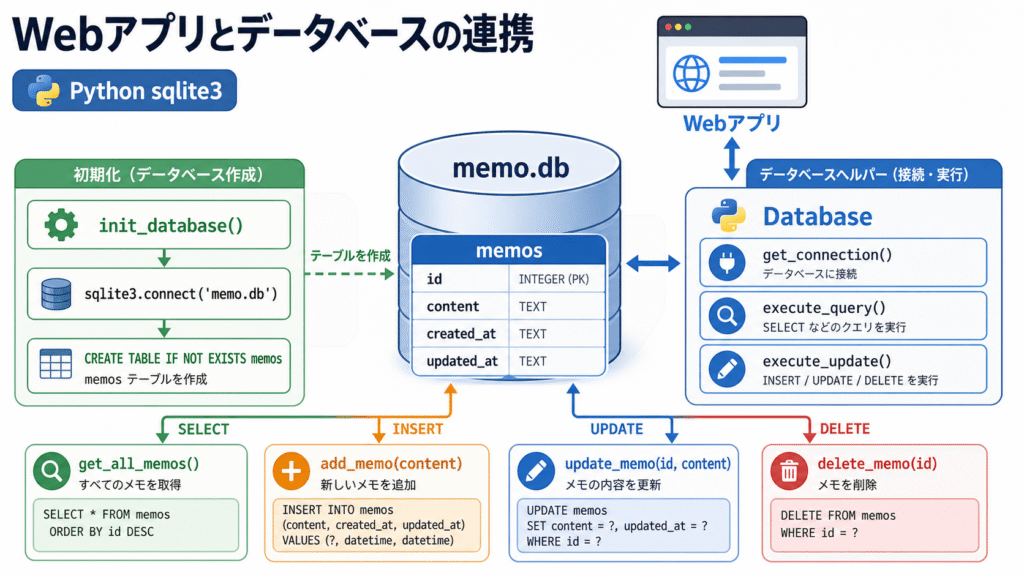
Pythonには標準でSQLiteがバンドルされており、追加のインストールなしで利用できるため、学習に最適です。
SQLiteの基本
SQLiteはサーバーレスの軽量なリレーショナルデータベースで、以下の特徴があります。
- 設定が不要で、ファイルベースで動作する
- Pythonの標準ライブラリに含まれている
- SQL(構造化クエリ言語)を使用してデータを操作する
- 小〜中規模のアプリケーションに適している
データベースの接続とテーブル作成
まずはデータベースに接続し、テーブルを作成する基本的なコードを見てみましょう。
import sqlite3

def init_database():
    """データベースを初期化し、テーブルを作成する"""
    # データベースに接続(ファイルが存在しない場合は新規作成)
    conn = sqlite3.connect('memo.db')
    cursor = conn.cursor()

    # メモテーブルを作成
    cursor.execute('''
        CREATE TABLE IF NOT EXISTS memos (
            id INTEGER PRIMARY KEY AUTOINCREMENT,
            content TEXT NOT NULL,
            created_at TIMESTAMP DEFAULT CURRENT_TIMESTAMP,
            updated_at TIMESTAMP DEFAULT CURRENT_TIMESTAMP
        )
    ''')

    # 変更を保存
    conn.commit()
    conn.close()
    print('✅ データベースの初期化が完了しました')

if __name__ == '__main__':
    init_database()
データベース操作用のヘルパー関数
Webアプリケーションからデータベースを操作しやすくするために、ヘルパー関数を作成します。
import sqlite3
from datetime import datetime

class Database:
    """データベース操作用のヘルパークラス"""

    @staticmethod
    def get_connection():
        """データベース接続を取得"""
        return sqlite3.connect('memo.db')

    @staticmethod
    def execute_query(query, params=None):
        """クエリを実行し、結果を返す(SELECT文用)"""
        conn = Database.get_connection()
        cursor = conn.cursor()
        if params:
            cursor.execute(query, params)
        else:
            cursor.execute(query)
        result = cursor.fetchall()
        conn.close()
        return result

    @staticmethod
    def execute_update(query, params=None):
        """更新クエリを実行(INSERT、UPDATE、DELETE文用)"""
        conn = Database.get_connection()
        cursor = conn.cursor()
        if params:
            cursor.execute(query, params)
        else:
            cursor.execute(query)
        last_id = cursor.lastrowid
        conn.commit()
        conn.close()
        return last_id

# データベース操作用の関数
def get_all_memos():
    """すべてのメモを取得(新しい順)"""
    query = '''
        SELECT id, content, created_at, updated_at
        FROM memos
        ORDER BY created_at DESC
    '''
    return Database.execute_query(query)

def add_memo(content):
    """新しいメモを追加"""
    query = 'INSERT INTO memos (content) VALUES (?)'
    return Database.execute_update(query, (content,))

def delete_memo(memo_id):
    """メモを削除"""
    query = 'DELETE FROM memos WHERE id = ?'
    Database.execute_update(query, (memo_id,))

def update_memo(memo_id, content):
    """メモを更新"""
    query = '''
        UPDATE memos
        SET content = ?, updated_at = CURRENT_TIMESTAMP
        WHERE id = ?
    '''
    Database.execute_update(query, (content, memo_id))
安全なデータベース操作の重要性
Webアプリケーションでデータベースを操作する際に最も重要なのが、SQLインジェクション対策です。SQLインジェクションとは、悪意のあるユーザーが入力にSQLコードを埋め込み、データベースを不正に操作する攻撃手法です。
危険な例(絶対にやらないでください)
# 危険!ユーザー入力を直接SQLに埋め込む
user_input = request.get('search')
query = f"SELECT * FROM memos WHERE content LIKE '%{user_input}%'"
# もし user_input が "'; DROP TABLE memos; --" だった場合...
安全な方法(パラメータ化クエリ)
# 安全:パラメータ化クエリを使用
user_input = request.get('search')
query = "SELECT * FROM memos WHERE content LIKE ?"
cursor.execute(query, (f'%{user_input}%',))
Webアプリケーションとの統合
それでは、これまでの知識を統合して、データベース連携機能を持ったメモ帳アプリケーションを完成させましょう。
完全なサーバーコード(server.py)
from http.server import HTTPServer, BaseHTTPRequestHandler
from urllib.parse import urlparse, parse_qs
import sqlite3
import os
import re
from datetime import datetime
# ============ データベース層 ============
class Database:
@staticmethod
def get_connection():
return sqlite3.connect('memo.db')
@staticmethod
def execute_query(query, params=None):
conn = Database.get_connection()
cursor = conn.cursor()
if params:
cursor.execute(query, params)
else:
cursor.execute(query)
result = cursor.fetchall()
conn.close()
return result
@staticmethod
def execute_update(query, params=None):
conn = Database.get_connection()
cursor = conn.cursor()
if params:
cursor.execute(query, params)
else:
cursor.execute(query)
last_id = cursor.lastrowid
conn.commit()
conn.close()
return last_id
def init_database():
"""データベースを初期化"""
conn = sqlite3.connect('memo.db')
cursor = conn.cursor()
cursor.execute('''
CREATE TABLE IF NOT EXISTS memos (
id INTEGER PRIMARY KEY AUTOINCREMENT,
content TEXT NOT NULL,
created_at TIMESTAMP DEFAULT CURRENT_TIMESTAMP,
updated_at TIMESTAMP DEFAULT CURRENT_TIMESTAMP
)
''')
conn.commit()
conn.close()
def get_all_memos():
query = 'SELECT id, content, created_at FROM memos ORDER BY created_at DESC'
return Database.execute_query(query)
def add_memo(content):
query = 'INSERT INTO memos (content) VALUES (?)'
return Database.execute_update(query, (content,))
def delete_memo(memo_id):
query = 'DELETE FROM memos WHERE id = ?'
Database.execute_update(query, (memo_id,))
# ============ テンプレート層 ============
def escape_html(text):
"""XSS対策のためのHTMLエスケープ"""
replacements = {
'&': '&',
'<': '<',
'>': '>',
'"': '"',
''': '''
}
for char, escape in replacements.items():
text = text.replace(char, escape)
return text
def render_template(template_name, context=None):
"""テンプレートをレンダリング"""
if context is None:
context = {}
try:
with open(f'templates/{template_name}', 'r', encoding='utf-8') as f:
template = f.read()
except FileNotFoundError:
return f'<h1>テンプレートが見つかりません: {template_name}</h1>'
for key, value in context.items():
template = template.replace(f'{{{{ {key} }}}}', str(value) if value is not None else '')
return template
# ============ HTTPハンドラ ============
class MyHandler(BaseHTTPRequestHandler):
def do_GET(self):
parsed_url = urlparse(self.path)
path = parsed_url.path
if path.startswith('/static/'):
self.serve_static(path)
return
if path == '/':
self.serve_index()
elif path.startswith('/delete?id='):
self.handle_delete(parsed_url)
else:
self.send_404()
def do_POST(self):
parsed_url = urlparse(self.path)
path = parsed_url.path
if path == '/':
self.handle_add_memo()
else:
self.send_404()
def serve_index(self):
"""メインページを表示"""
memos = get_all_memos()
memos_html = ''
if memos:
for memo in memos:
memo_id, content, created_at = memo
escaped_content = escape_html(content).replace('\n', '<br>')
memos_html += f'''
<div class="memo-item">
<div class="memo-content">{escaped_content}</div>
<div class="memo-meta">
<span class="memo-date">{created_at}</span>
<a href="/delete?id={memo_id}" class="delete-link" onclick="return confirm('本当に削除しますか?')">削除</a>
</div>
</div>
'''
else:
memos_html = '<p class="no-memos">メモがありません。最初のメモを追加してみましょう!</p>'
html = render_template('index.html', {
'memos': memos_html,
'memo_count': len(memos)
})
self.send_response(200)
self.send_header('Content-type', 'text/html; charset=utf-8')
self.end_headers()
self.wfile.write(html.encode('utf-8'))
def handle_add_memo(self):
"""メモを追加"""
content_length = int(self.headers.get('Content-Length', 0))
body = self.rfile.read(content_length).decode('utf-8')
params = parse_qs(body)
content = params.get('content', [''])[0].strip()
if content:
add_memo(content)
self.redirect('/')
def handle_delete(self, parsed_url):
"""メモを削除"""
params = parse_qs(parsed_url.query)
memo_id = params.get('id', [''])[0]
if memo_id and memo_id.isdigit():
delete_memo(int(memo_id))
self.redirect('/')
def serve_static(self, path):
"""静的ファイルを配信"""
try:
filepath = path[1:]
with open(filepath, 'rb') as f:
content = f.read()
if path.endswith('.css'):
content_type = 'text/css; charset=utf-8'
elif path.endswith('.js'):
content_type = 'application/javascript; charset=utf-8'
else:
content_type = 'application/octet-stream'
self.send_response(200)
self.send_header('Content-type', content_type)
self.end_headers()
self.wfile.write(content)
except FileNotFoundError:
self.send_404()
def redirect(self, path):
"""リダイレクト"""
self.send_response(302)
self.send_header('Location', path)
self.end_headers()
def send_404(self):
self.send_response(404)
self.send_header('Content-type', 'text/html; charset=utf-8')
self.end_headers()
self.wfile.write('<h1>404 Not Found</h1>'.encode('utf-8'))
# ============ サーバー起動 ============
def run():
init_database()
os.makedirs('templates', exist_ok=True)
os.makedirs('static', exist_ok=True)
server = HTTPServer(('localhost', 8000), MyHandler)
print('🚀 データベース連携版メモ帳アプリを起動しました')
print('📡 アドレス: http://localhost:8000')
print('💾 データベース: memo.db')
print('🔄 終了するには Ctrl+C を押してください')
try:
server.serve_forever()
except KeyboardInterrupt:
print('\n🛑 サーバーを停止しました')
server.server_close()
if __name__ == '__main__':
run()テンプレート(templates/index.html)
<meta charset="UTF-8">
<meta name="viewport" content="width=device-width, initial-scale=1.0">
<title>メモ帳(データベース版)</title>
<link rel="stylesheet" href="/static/style.css">

<div class="container">
    <header>
        <h1>📝 メモ帳</h1>
        <span class="badge">合計 {{ memo_count }} 件</span>
    </header>

    <section class="add-memo">
        <form method="POST">
            <textarea name="content" placeholder="新しいメモを入力してください..." rows="3"></textarea>
            <button type="submit">メモを追加</button>
        </form>
    </section>

    <section class="memo-list">
        {{ memos }}
    </section>
</div>CSS(static/style.css)
* {
    margin: 0;
    padding: 0;
    box-sizing: border-box;
}

body {
    font-family: -apple-system, BlinkMacSystemFont, 'Segoe UI', Roboto, sans-serif;
    background: #f0f2f5;
    color: #333;
    line-height: 1.6;
    padding: 20px;
}

.container {
    max-width: 700px;
    margin: 0 auto;
}

header {
    display: flex;
    justify-content: space-between;
    align-items: center;
    margin-bottom: 30px;
}

h1 {
    font-size: 28px;
    color: #1a1a2e;
}

.badge {
    background: #16213e;
    color: white;
    padding: 4px 12px;
    border-radius: 20px;
    font-size: 14px;
}

.add-memo {
    background: white;
    padding: 20px;
    border-radius: 12px;
    box-shadow: 0 2px 8px rgba(0,0,0,0.08);
    margin-bottom: 30px;
}

textarea {
    width: 100%;
    padding: 12px;
    border: 2px solid #e0e0e0;
    border-radius: 8px;
    font-size: 16px;
    font-family: inherit;
    resize: vertical;
    transition: border-color 0.3s;
}

textarea:focus {
    outline: none;
    border-color: #4a90d9;
}

button {
    background: #4a90d9;
    color: white;
    border: none;
    padding: 10px 24px;
    border-radius: 8px;
    font-size: 16px;
    cursor: pointer;
    margin-top: 10px;
    transition: background 0.3s;
}

button:hover {
    background: #357abd;
}

.memo-item {
    background: white;
    padding: 16px 20px;
    border-radius: 12px;
    box-shadow: 0 2px 8px rgba(0,0,0,0.08);
    margin-bottom: 12px;
}

.memo-item:last-child {
    margin-bottom: 0;
}

.memo-content {
    font-size: 16px;
    white-space: pre-wrap;
    word-break: break-word;
}

.memo-meta {
    display: flex;
    justify-content: space-between;
    align-items: center;
    margin-top: 10px;
    padding-top: 10px;
    border-top: 1px solid #f0f0f0;
    font-size: 14px;
    color: #999;
}

.delete-link {
    color: #e74c3c;
    text-decoration: none;
    font-weight: 500;
}

.delete-link:hover {
    text-decoration: underline;
}

.no-memos {
    text-align: center;
    padding: 40px 20px;
    color: #999;
    font-size: 16px;
}
SQLiteの管理コマンド
データベースを直接確認したい場合は、以下のコマンドを使用します。
# SQLiteの対話モードを起動
sqlite3 memo.db

# テーブル一覧を表示
.tables

# テーブルのスキーマを表示
.schema memos

# すべてのデータを表示
SELECT * FROM memos;

# 終了
.quit
データベースを安全かつ効率的に利用するためには、いくつかの重要なポイントがあります。まず、SQLインジェクションを防ぐために、ユーザーが入力した値をSQL文へ直接埋め込むのではなく、必ずパラメータ化クエリを使用することが重要です。また、データベース接続は使用後に必ず conn.close() を実行して適切にクローズし、不要なリソース消費を防ぐ必要があります。
さらに、複数のデータベース操作をまとめて実行する場合は、BEGIN TRANSACTION と COMMIT を利用してトランザクションを適切に管理することで、データの整合性を保つことができます。データベース操作では例外が発生する可能性があるため、try-except を用いたエラーハンドリングを実装し、異常時にも適切に対応できるようにしておくことも重要です。
パフォーマンスの向上という観点では、頻繁に検索を行うカラムにインデックスを作成することで、検索速度を大幅に改善できます。また、万が一のデータ消失に備えて、データベースファイル(memo.db)を定期的にバックアップする習慣を身につけることも、安全なデータ運用には欠かせません。
まとめ
今回はPythonの標準ライブラリとSQLiteを使用して、Webアプリケーションとデータベースを連携させる方法を学びました。データベースを使用することで、アプリケーションのデータを永続化し、同時アクセスやデータの整合性といった問題に対処できるようになりました。また、パラメータ化クエリを使用したSQLインジェクション対策など、安全なデータベース操作のベストプラクティスも実装しました。これらの知識を基に、より本格的なWebアプリケーション開発に挑戦してみてください。