はじめに
現代のソフトウェア開発において、Web APIは不可欠な要素となっています。私たちが日常的に使用するスマートフォンアプリ、Webサービス、クラウドアプリケーションのほとんどは、何らかの形でWeb APIを利用しています。例えば、天気アプリは気象データをAPIから取得し、SNSアプリはサーバーとAPIで通信し、ECサイトは決済サービスとAPIで連携しています。
この記事では、特にREST APIに焦点を当て、Web APIの基本概念から実際の使い方まで、初学者向けに詳しく解説します。Pythonの基本的な文法を既に理解していることを前提に、実践的な知識を提供します。
Web APIとは何か
APIの基本概念
API(Application Programming Interface)は、ソフトウェアコンポーネント同士が通信するための規約とツールの集合です。Web APIは、Webを通じてサービスやデータにアクセスするためのAPIを指します。
簡単な例で理解しましょう
- レストランでの注文を想像してください
- あなた(クライアント)はメニュー(API仕様書)を見て、ウエイター(API)を通じて厨房(サーバー)に注文します
- 厨房は料理(データ)を準備し、ウエイターを通じてあなたに提供します
- あなたは厨房の内部事情を知る必要はなく、メニューに従って注文するだけで良いのです
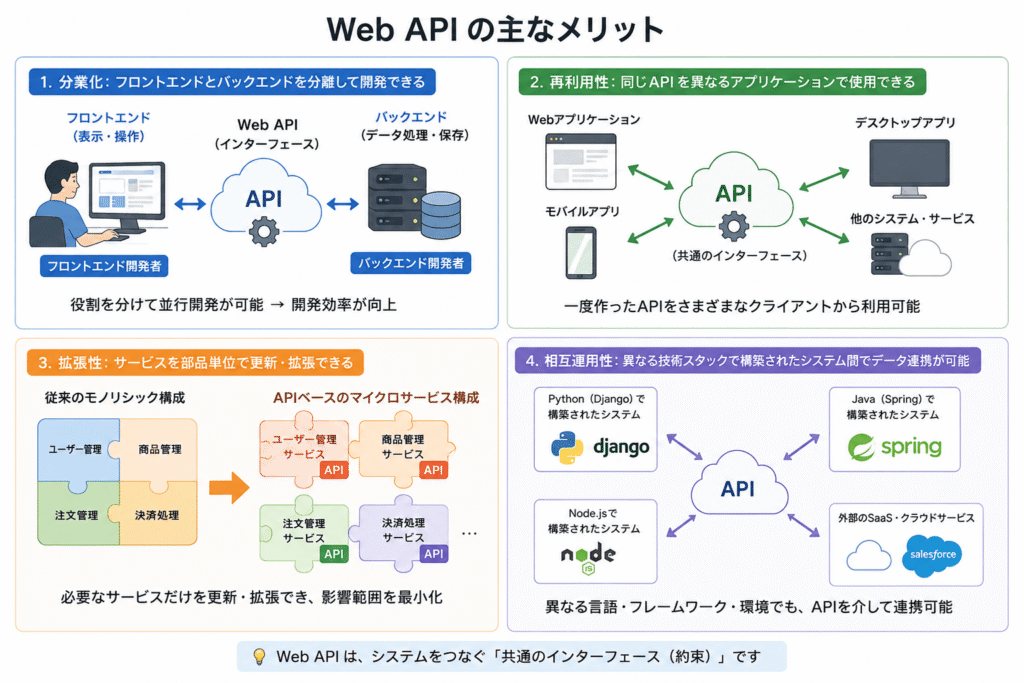
Web APIの役割と利点
- 分業化: フロントエンドとバックエンドを分離して開発できる
- 再利用性: 同じAPIを異なるアプリケーション(Web、モバイル、デスクトップ)で使用できる
- 拡張性: サービスを部品単位で更新・拡張できる
- 相互運用性: 異なる技術スタックで構築されたシステム間でデータ連携が可能
REST APIの理解
RESTとは
REST(Representational State Transfer)は、Webサービスの設計原則の集合です。Roy Fieldingによって2000年に博士論文で提唱され、現在最も広く採用されているAPI設計スタイルです。RESTは以下の6つの architectural constraints(アーキテクチャ制約)に基づいています。
- 統一インターフェース: 標準化された方法で通信する
- ステートレス性: 各リクエストは独立して理解できる
- キャッシュ可能性: レスポンスはキャッシュ可能と明示する
- クライアント・サーバー: 関心の分離
- 階層化システム: 複数階層のアーキテクチャを可能にする
- コードオンデマンド(オプション): クライアントにコードを送信できる
もしREST APIがないとシステム間の通信方式は各プロジェクトごとにバラバラで、開発者は新しいAPIに触れるたびに独自仕様を理解し直さなければなりません。特定の企業や製品しか使わないプロトコルやフォーマットが多く、他のサービスと簡単に連携できるとは限らず、再利用性も低くなりがちです。さらに、データ取得のために複雑なXMLメッセージや重たいプロトコルを扱う必要があり、シンプルな通信ですら冗長になりがちです。
その結果、Webのように広大で異種が混在する環境では、共通のルールがないことが障害となり、サービス同士を連携させるのに大きなコストと時間がかかります。RESTのように「URLでリソースを表し、HTTPの標準機能を活かす」という共通基盤ができたことで、開発者体験、拡張性、相互運用性が改善されました。
RESTful APIの特徴
リソースベースの設計
RESTでは、すべてのデータを「リソース」として捉え、そのリソースをURLによって一意に識別します。たとえば /users/123 や /products/456 のように、URLがそのまま対象データを指し示す仕組みです。
- すべてのデータは「リソース」として扱われる
- リソースはURL(エンドポイント)で一意に識別される
- 例:
/users/123,/products/456
HTTPメソッドの適切な使用
RESTでは、操作の種類ごとに適切なHTTPメソッドを使い分けます。GETはリソースの取得、POSTは新規作成、PUTは全体の更新、PATCHは部分的な更新、DELETEは削除といったように、メソッド自体が意図する処理を明確に表します。
- GET: リソースの取得
- POST: 新しいリソースの作成
- PUT: リソースの完全更新
- PATCH: リソースの部分更新
- DELETE: リソースの削除
HTTPの基礎知識
HTTPメソッド(動詞)
REST APIでは、HTTPメソッドを操作の種類を示すために使用します。requests ライブラリを使ってユーザー情報を操作する一連のREST APIリクエストを示しています。ユーザー一覧を取得し、新しいユーザーを作成し、既存ユーザー(ID 123)の内容を更新し、最後にそのユーザーを削除するという流れを、HTTPメソッドごとに実行しています。
# 実際のAPIリクエスト例(概念的理解のため)
import requests

# GET - データ取得
response = requests.get('https://api.example.com/users')

# POST - 新規作成
new_user = {'name': '山田太郎', 'email': 'taro@example.com'}
response = requests.post('https://api.example.com/users', json=new_user)

# PUT - 更新
updated_user = {'name': '山田花子', 'email': 'hanako@example.com'}
response = requests.put('https://api.example.com/users/123', json=updated_user)

# DELETE - 削除
response = requests.delete('https://api.example.com/users/123')
HTTPステータスコード
HTTPステータスコードとは、サーバーがクライアントからのリクエストに対して返す「結果を示す番号」で、成功・エラー・リダイレクトなど通信の状態を簡潔に伝えるための仕組みです。
成功系(200番台)
200 OK: リクエスト成功201 Created: リソース作成成功204 No Content: リクエスト成功、但しコンテンツなし
リダイレクト系(300番台)
301: Moved Permanently:(恒久的なリダイレクト)302: Found:(一時的なリダイレクト)304: Not Modified:(変更なし・キャッシュを使用)
クライアントエラー(400番台)
400 Bad Request: リクエストが不正401 Unauthorized: 認証が必要403 Forbidden: アクセス権限なし404 Not Found: リソース不存在405 Method Not Allowed:許可されていないHTTPメソッドが使われた408 Request Timeout:クライアントが応答しなかったためタイムアウト409 Conflict:リソースの状態と競合して処理できない429 Too Many Requests:短時間に過剰なリクエストが送られた
サーバーエラー(500番台)
500 Internal Server Error: サーバー内部エラー501 Not Implemented: サーバーがリクエスト機能をサポートしていない502 Bad Gateway: ゲートウェイやプロキシ経由で不正なレスポンスを受け取った503 Service Unavailable: サービス利用不可504 Gateway Timeoutゲートウェイやプロキシなどの応答を待機中にタイムアウト
REST APIの設計原則
REST APIの設計原則では、まずエンドポイント設計が重要です。リソースごとに明確なURLを割り当て、リソースの階層や関係性を直感的に表現することで、誰が見ても理解しやすく操作しやすいAPIになります。例えば、ユーザーに関連する投稿を扱う場合は /users/123/posts のように、リソース間の親子関係や所属関係をURL構造に反映させることが推奨されます。また、操作の種類はHTTPメソッドで表現し、URL自体はリソースを示すものに限定するのが原則です。
さらに、バージョニングもREST API設計の重要なポイントです。APIは公開後に仕様変更や機能追加が行われることが避けられないため、既存のクライアントへの影響を最小化するためにバージョン管理を行います。一般的にはURLにバージョン番号を含める方法(例: /v1/users)や、HTTPヘッダでバージョンを指定する方法があり、これにより古いバージョンを使うクライアントと新しいバージョンを使うクライアントを共存させることができます。適切なエンドポイント設計とバージョニングを組み合わせることで、拡張性と互換性の高いAPIを構築できます。
エンドポイント設計のベストプラクティス
良い例:
GET    /users          # ユーザー一覧取得
POST   /users          # 新規ユーザー作成
GET    /users/123      # 特定ユーザー情報取得
PUT    /users/123      # ユーザー情報更新
DELETE /users/123      # ユーザー削除
GET    /users/123/orders  # ユーザーの注文一覧
悪い例:
GET    /getUsers
POST   /createUser
GET    /getUserById
POST   /updateUser
GET    /deleteUser
バージョニング
APIの変更による互換性問題を防ぐため、バージョン管理が重要です。
# バージョン管理の例
https://api.example.com/v1/users
https://api.example.com/v2/users
データ形式
JSON(JavaScript Object Notation)
REST APIでは、データ交換形式としてJSONが最も一般的に使用されます。次の例は、userオブジェクトの中にIDや名前、メールアドレス、アカウント状態、作成日時などの基本情報があり、さらにprofileで年齢や都市、hobbiesで趣味のリストを階層的に保持しています。
{
  "user": {
    "id": 123,
    "name": "山田太郎",
    "email": "taro@example.com",
    "is_active": true,
    "created_at": "2024-01-15T10:30:00Z",
    "profile": {
      "age": 28,
      "city": "東京"
    },
    "hobbies": ["読書", "旅行", "写真"]
  }
}
PythonでのJSON処理
Pythonの辞書型オブジェクトを json.dumps を使ってJSON文字列に変換し、ensure_ascii=False によって日本語も文字化けせずに出力しています。次に、JSON形式の文字列を json.loads で再びPythonの辞書に変換し、キーを指定して値を取り出しています。
import json

# Pythonオブジェクト → JSON文字列
user_data = {
    'name': '山田太郎',
    'age': 28,
    'hobbies': ['読書', '旅行']
}
json_string = json.dumps(user_data, ensure_ascii=False)
print(json_string)

# JSON文字列 → Pythonオブジェクト実際のREST API使用例
公開APIを利用する
多くの企業や組織が無料で利用できる公開APIを提供しています。get_github_user_info 関数は、ユーザー名をURLに組み込んでGETリクエストを送り、レスポンスが成功(ステータスコード200)の場合はJSONを辞書に変換して名前、所属、ブログ、所在地、公開リポジトリ数などを取り出します。エラーやタイムアウトが発生した場合は例外処理でメッセージを表示し、None を返すようになっています。最後に取得した情報をループで表示する使用例も示されています。
import requests
import json

def get_github_user_info(username):
    """
    GitHub APIからユーザー情報を取得
    """
    url = f"https://api.github.com/users/{username}"

    try:
        response = requests.get(url, timeout=10)

        if response.status_code == 200:
            user_data = response.json()
            return {
                'name': user_data.get('name', '名前なし'),
                'company': user_data.get('company', '所属なし'),
                'blog': user_data.get('blog', 'ブログなし'),
                'location': user_data.get('location', '所在地なし'),
                'public_repos': user_data.get('public_repos', 0)
            }
        else:
            print(f"エラー: {response.status_code}")
            return None

    except requests.exceptions.RequestException as e:
        print(f"リクエストエラー: {e}")
        return None

# 使用例
user_info = get_github_user_info("torvalds")
if user_info:
    print("GitHubユーザー情報:")
    for key, value in user_info.items():
        print(f"  {key}: {value}")
ページネーションの処理
多くのAPIは大量のデータをページ単位で返します。GitHub APIは1回のリクエストで取得できるリポジトリ数が制限されているため、page と per_page を使ったページネーションに対応しています。各ページのリポジトリを取得してリストに追加し、空のページが返ってきたら取得を終了します。リクエストごとに1秒待機することで、GitHubのレート制限にも配慮しています。ステータスコードが200以外の場合はエラーを表示して処理を中断します。
def get_all_github_repos(username):
    """
    すべてのリポジトリを取得(ページネーション対応)
    """
    repos = []
    page = 1
    per_page = 100

    while True:
        url = f"https://api.github.com/users/{username}/repos"
        params = {
            'page': page,
            'per_page': per_page
        }

        response = requests.get(url, params=params, timeout=10)

        if response.status_code == 200:
            page_repos = response.json()
            if not page_repos:  # 空のページで終了
                break

            repos.extend(page_repos)
            print(f"ページ {page}: {len(page_repos)} リポジトリ取得")

            # 次のページへ
            page += 1

            # レート制限を考慮して少し待機
            import time
            time.sleep(1)

        else:
            print(f"エラー: {response.status_code}")
            break

    return repos
APIキー認証
多くの公開APIでは、APIキーを使用した認証が必要です。OpenWeatherMapのAPIキーを使って指定した都市の天気情報を取得する関数です。関数は都市名とAPIキーを受け取り、リクエストパラメータに単位(摂氏)や日本語表示を設定してAPIにGETリクエストを送ります。レスポンスが成功(ステータスコード200)であればJSON形式で天気データを返し、失敗した場合はエラーコードを表示して None を返します。
def get_weather_with_api_key(city, api_key):
    """
    APIキーを使用した天気情報取得
    """
    url = "https://api.openweathermap.org/data/2.5/weather"
    params = {
        'q': city,
        'appid': api_key,
        'units': 'metric',
        'lang': 'ja'
    }

    response = requests.get(url, params=params, timeout=10)

    if response.status_code == 200:
        return response.json()
    else:
        print(f"天気情報取得失敗: {response.status_code}")
        return None
環境変数によるAPIキー管理
環境変数 WEATHER_API_KEY からAPIキーを安全に取得する例です。もし環境変数が設定されていなければ、警告メッセージを表示してAPIキーの設定を促します。これにより、ソースコードに直接キーを記載せずに安全に管理できます。
import os

# 環境変数からAPIキーを安全に取得
API_KEY = os.getenv('WEATHER_API_KEY')

if not API_KEY:
    print("APIキーが設定されていません")
    print("環境変数 WEATHER_API_KEY を設定してください")
エラーハンドリングとAPIクライアントの実装
APIとの通信を簡潔かつ堅牢に行うための APIClient クラスの例です。コンストラクタでベースURLと任意のAPIキーを受け取り、セッションヘッダーに認証情報を設定できます。make_request メソッドでは、GETやPOSTリクエストを送信し、ステータスコード200ならJSONを返します。429(レート制限)時には指数バックオフで再試行し、その他のエラーや例外もリトライ処理を行うことで、安定したAPI呼び出しを実現しています。最後に、users/123 へのGETリクエスト例も示されています。
import requests
import time

class APIClient:
    def __init__(self, base_url, api_key=None):
        self.base_url = base_url
        self.session = requests.Session()

        if api_key:
            self.session.headers.update({
                'Authorization': f'Bearer {api_key}'
            })

    def make_request(self, endpoint, method='GET', params=None, data=None, max_retries=3):
        """
        堅牢なAPIリクエストメソッド
        """
        url = f"{self.base_url}/{endpoint}"

        for attempt in range(max_retries):
            try:
                if method.upper() == 'GET':
                    response = self.session.get(url, params=params, timeout=10)
                elif method.upper() == 'POST':
                    response = self.session.post(url, json=data, timeout=10)
                else:
                    raise ValueError(f"未対応のHTTPメソッド: {method}")

                # ステータスコードチェック
                if response.status_code == 200:
                    return response.json()
                elif response.status_code == 429:  # レート制限
                    wait_time = 2 ** attempt  # 指数バックオフ
                    print(f"レート制限。{wait_time}秒待機...")
                    time.sleep(wait_time)
                    continue
                else:
                    print(f"APIエラー: {response.status_code} - {response.text}")
                    return None

            except requests.exceptions.RequestException as e:
                print(f"リクエストエラー (試行 {attempt + 1}): {e}")
                if attempt == max_retries - 1:
                    return None
                time.sleep(1)  # リトライ前に待機

        return None

# 使用例
client = APIClient('https://api.example.com/v1')
user_data = client.make_request('users/123')
タスク管理API連携
create_task メソッドで新しいタスクを作成し、get_tasks でタスク一覧を取得、update_task で既存タスクの更新を行います。各メソッドはHTTPメソッド(POST、GET、PATCH)を使い、ステータスコードを確認して成功時はJSONを返し、失敗時はエラーを表示する設計になっています。
import requests

class TaskManager:
    def __init__(self, api_base_url):
        self.api_base_url = api_base_url

    def create_task(self, title, description, due_date=None):
        """新しいタスクを作成"""
        task_data = {
            'title': title,
            'description': description,
            'due_date': due_date,
            'completed': False
        }

        response = requests.post(
            f"{self.api_base_url}/tasks",
            json=task_data,
            timeout=10
        )

        if response.status_code == 201:
            return response.json()
        else:
            print(f"タスク作成失敗: {response.status_code}")
            return None

    def get_tasks(self, completed=None):
        """タスク一覧を取得"""
        params = {}
        if completed is not None:
            params['completed'] = completed

        response = requests.get(
            f"{self.api_base_url}/tasks",
            params=params,
            timeout=10
        )

        if response.status_code == 200:
            return response.json()
        else:
            print(f"タスク取得失敗: {response.status_code}")
            return None

    def update_task(self, task_id, updates):
        """タスクを更新"""
        response = requests.patch(
            f"{self.api_base_url}/tasks/{task_id}",
            json=updates,
            timeout=10
        )

        if response.status_code == 200:
            return response.json()
        else:
            print(f"タスク更新失敗: {response.status_code}")
            return None
まとめ
REST APIは現代のWeb開発において中心的な役割を果たしており、その理解は外部サービスとの連携やモダンなWebアプリケーションの構築、マイクロサービスやクラウドサービスとの効率的な連携に不可欠です。
本記事で学んだ内容をまとめると、まず基本概念としてWeb APIとRESTの考え方を理解することが重要です。設計原則としては、すべてのデータを「リソース」として扱い、URLで一意に識別するリソースベースの設計と、GET・POST・PUT・PATCH・DELETEといったHTTPメソッドを適切に使い分けることが挙げられます。
実践的な技術としては、Pythonの requests ライブラリを用いたAPIリクエスト例や、ページネーション対応やリトライ処理を含む堅牢なリクエスト方法、JSONデータの操作方法などを学びました。また、セキュリティ面ではAPIキーの環境変数による安全な管理や、認証ヘッダーの利用といった基本も押さえています。これらを総合的に理解することで、開発者は安定かつ拡張性の高いAPI連携アプリケーションを設計・実装できるようになります。
実際に公開されているAPI(GitHub API、天気API、ニュースAPIなど)を使って練習することで、理解が深まります。まずは簡単なAPIから始めて、徐々に複雑な連携に挑戦してみましょう。
演習問題
初級問題ヒント
- 基本的なHTTPリクエストの理解
- ステータスコードの適切な処理
- シンプルなエラーハンドリング
中級問題ヒント
- 並行処理によるパフォーマンス改善
- キャッシュ機構による効率化
- データ変換と正規化
上級問題ヒント
- 設計パターンの適用
- 複数サービスの協調動作
- 監視とメトリクス収集
初級問題(3問)
問題1:
以下のREST APIの基本概念について説明し、具体例を示してください。
- HTTPメソッド(GET, POST, PUT, DELETE)の役割と使用例
- ステータスコード(200, 201, 400, 404, 500)の意味
以下のユーザー管理システムを例に、適切なエンドポイント設計を示してください。
ユーザー一覧取得
新規ユーザー登録
特定ユーザー情報取得
ユーザー情報更新
ユーザー削除
問題2:
JSONPlaceholder APIを使用して、以下の操作を行うコードを作成してください。
- すべての投稿(posts)を取得し、タイトルの一覧を表示
- ユーザーIDが1の投稿のみをフィルタリングして表示
使用するエンドポイント:
- GET /posts
- GET /posts?userId=1
注意: 適切なエラーハンドリングを実装してください。
ベースURL:https://jsonplaceholder.typicode.com
実行結果:
=== ユーザー1の投稿 ===
1. sunt aut facere repellat provident occaecati excepturi optio reprehenderit
2. qui est esse
3. ea molestias quasi exercitationem repellat qui ipsa sit aut
初級3:
問題2の続きでJSONPlaceholder APIを使用して、以下の操作を行うコードを作成してください。
1. 新しい投稿を作成(タイトル、本文、ユーザーIDを指定)
2. 作成した投稿が正しく生成されたか確認(ただし新規投稿はできないため、投稿IDは100で取得し確認)
使用するエンドポイント:
- POST /posts
- GET /posts/{id}
注意: 適切なエラーハンドリングを実装してください。
ベースURL:https://jsonplaceholder.typicode.com
=== 新しい投稿を作成 ===
投稿作成成功!ID: 101
タイトル: Python学習記録
本文: 今日はREST APIについて学びました。

=== 作成した投稿の確認 ===
確認結果: 投稿ID 100 が見つかりました
タイトル: at nam consequatur ea labore ea harum
中級問題(6問)
問題4:
GitHub APIを使用して、以下の分析を行うコードを作成してください。
- 特定のユーザー(例: ‘torvalds’)の公開リポジトリをすべて取得
- 各リポジトリについて以下の情報を抽出:
- リポジトリ名
- 説明
- スター数
- フォーク数
- 使用言語
- スター数の多い順にトップ5を表示
- 言語別のリポジトリ数を集計して表示
エンドポイント: https://api.github.com/users/{username}/repos
※演習例ではユーザー’torvalds’を使用してます。
実行結果:
GitHubリポジトリ分析

torvalds の公開リポジトリ数: 12

=== スター数トップ5 ===
1. linux
   スター: 235344, フォーク: 62699
   言語: C
   説明: Linux kernel source tree...

2. AudioNoise
   スター: 4373, フォーク: 206
   言語: C
   説明: Random digital audio effects...

3. uemacs
   スター: 2037, フォーク: 308
   言語: C
   説明: Random version of microemacs with my private modificatons...

4. GuitarPedal
   スター: 1968, フォーク: 75
   言語: C
   説明: Linus learns analog circuits...

5. test-tlb
   スター: 1004, フォーク: 218
   言語: C
   説明: Stupid memory latency and TLB tester...

=== 言語別リポジトリ数 ===
C: 10リポジトリ
OpenSCAD: 1リポジトリ
C++: 1リポジトリ
ベースコード:
import requests
from collections import defaultdict

def analyze_github_repos(username):
    """
    GitHub APIを使用してユーザーのリポジトリを分析
    """
    url = f"https://api.github.com/users/{username}/repos"

    # ここにコードを書いてください

# 実行
print("GitHubリポジトリ分析\n")
repos = analyze_github_repos("torvalds")
問題5:
ページネーションに対応したAPIクライアントを作成してください。
要件:
- 指定されたエンドポイントからすべてのデータを取得
- ページネーションパラメータを自動処理
- 進捗状況を表示
- 取得件数の制限オプションを追加
JSONPlaceholderのコメントデータを使用:
https://jsonplaceholder.typicode.com/comments
注意: 実際のAPIはページネーションをサポートしていませんが、
模擬的に実装してください(例: _page, _limitパラメータ)。
実行結果:
コメントデータをページネーションで取得します
ページネーション処理を開始...
ページ 1 を取得中...
  取得済み: 20件
ページ 2 を取得中...
  取得済み: 40件
ページ 3 を取得中...
  取得済み: 60件
ページ 4 を取得中...
  取得済み: 80件
ページ 5 を取得中...
  取得済み: 100件
制限数 100 に達したため終了

最終結果: 100件のコメントを取得

=== 取得したコメントのサンプル ===
1. [1] id labore ex et quam laborum
   メール: Eliseo@gardner.biz
   本文: laudantium enim quasi est quidem magnam voluptate ...

2. [2] quo vero reiciendis velit similique earum
   メール: Jayne_Kuhic@sydney.com
   本文: est natus enim nihil est dolore omnis voluptatem n...

3. [3] odio adipisci rerum aut animi
   メール: Nikita@garfield.biz
   本文: quia molestiae reprehenderit quasi aspernatur
aut ...
ベースコード:
import requests

# ページネーションに対応したデータ取得関数
def get_paginated_data(base_url, limit=None):
    """
    ページネーションに対応したデータ取得関数
    """
    all_data = []
    page = 1
    per_page = 20

    print("ページネーション処理を開始...")

    # ここにコードを書いてください


# コメントデータをページネーションで取得
def get_comments_with_pagination():

    base_url = "https://jsonplaceholder.typicode.com/comments"

    print("コメントデータをページネーションで取得します")
    comments = get_paginated_data(base_url, limit=100)


# テスト実行
comments = get_paginated_data("https://jsonplaceholder.typicode.com/comments", limit=100)
print(f"取得したコメント数: {len(comments)}")
問題6:
堅牢なAPIクライアントクラスを作成してください。
要件:
- 自動リトライ機能(指数バックオフ)
- 各種例外の適切な処理
- レート制限の検出と対応
- タイムアウト設定
- リクエストのログ記録
以下のエンドポイントでテスト:
https://httpstat.us/200(成功)
https://httpstat.us/500(失敗)
https://httpstat.us/429(レート制限)
実行結果:
堅牢なAPIクライアントのテスト

成功ケースのテスト:
2026-06-05 11:04:15,063 - INFO - 試行 1/3: https://httpstat.us/200
2026-06-05 11:04:21,190 - ERROR - 接続エラー (試行 1)
2026-06-05 11:04:21,190 - INFO - 試行 2/3: https://httpstat.us/200
2026-06-05 11:04:31,204 - ERROR - タイムアウト (試行 2)
2026-06-05 11:04:31,205 - INFO - 試行 3/3: https://httpstat.us/200
2026-06-05 11:04:36,869 - ERROR - 接続エラー (試行 3)
失敗: ('Connection aborted.', RemoteDisconnected('Remote end closed connection without response'))

=== 成功ケーステスト ===
2026-06-05 11:04:36,870 - INFO - 試行 1/3: https://httpstat.us/200
2026-06-05 11:04:37,866 - ERROR - 接続エラー (試行 1)
2026-06-05 11:04:37,866 - INFO - 試行 2/3: https://httpstat.us/200
2026-06-05 11:04:44,519 - ERROR - 接続エラー (試行 2)
2026-06-05 11:04:44,520 - INFO - 試行 3/3: https://httpstat.us/200
2026-06-05 11:04:46,500 - ERROR - 接続エラー (試行 3)
失敗: ('Connection aborted.', RemoteDisconnected('Remote end closed connection without response'))

=== サーバーエラーテスト ===
2026-06-05 11:04:46,500 - INFO - 試行 1/3: https://httpstat.us/500
2026-06-05 11:04:56,511 - ERROR - タイムアウト (試行 1)
2026-06-05 11:04:56,511 - INFO - 試行 2/3: https://httpstat.us/500
2026-06-05 11:05:06,014 - ERROR - 接続エラー (試行 2)
2026-06-05 11:05:06,014 - INFO - 試行 3/3: https://httpstat.us/500
2026-06-05 11:05:07,248 - ERROR - 接続エラー (試行 3)
失敗: ('Connection aborted.', RemoteDisconnected('Remote end closed connection without response'))

=== レート制限テスト ===
2026-06-05 11:05:07,248 - INFO - 試行 1/3: https://httpstat.us/429
2026-06-05 11:05:13,037 - ERROR - 接続エラー (試行 1)
2026-06-05 11:05:13,037 - INFO - 試行 2/3: https://httpstat.us/429
2026-06-05 11:05:14,242 - ERROR - 接続エラー (試行 2)
2026-06-05 11:05:14,242 - INFO - 試行 3/3: https://httpstat.us/429
2026-06-05 11:05:24,255 - ERROR - タイムアウト (試行 3)
失敗: HTTPSConnectionPool(host='httpstat.us', port=443): Max retries exceeded with url: /429 (Caused by ConnectTimeoutError(, 'Connection to httpstat.us timed out. (connect timeout=10)'))
ベースコード:
import requests
import time
import logging

# ロギングの設定
logging.basicConfig(
    level=logging.INFO,
    format='%(asctime)s - %(levelname)s - %(message)s'
)

class RobustAPIClient:
    def __init__(self, base_url, max_retries=3):
        # ここにコードを書いてください


    # メインのリクエストメソッド
    def make_request(self, endpoint, method='GET', params=None):

        # ここにコードを書いてください


# テスト
print("堅牢なAPIクライアントのテスト\n")
client = RobustAPIClient("https://httpstat.us")

# 成功ケース
print("成功ケースのテスト:")
try:
    result = client.get_api_status()
    print(f"成功: {result}")
except Exception as e:
    print(f"失敗: {e}")

# エラーケースのテスト
client.test_error_scenarios()
問題7:
複数のAPIからデータを取得し、統一フォーマットに変換するシステムを構築。
要件:
- JSONPlaceholderからユーザーデータを取得
- JSONPlaceholderから投稿データを取得
- 両方のデータを結合して、ユーザーごとの投稿情報を作成
- 以下の形式で出力:
{
“user_id”: 1,
“user_name”: “Leanne Graham”,
“email”: “Sincere@april.biz”,
“post_count”: 10,
“posts”: […]
}
使用エンドポイント:
/users
/posts?userId={id}
実行結果:
データ変換と正規化の処理を開始...

ユーザーデータを取得中...
10人のユーザーを取得
投稿データを取得中...
100件の投稿を取得

レポート作成完了: 10ユーザー

=== ユーザー詳細(最初の3名)===

ユーザー: Leanne Graham
メール: Sincere@april.biz
投稿数: 10
最近の投稿:
  1. sunt aut facere repellat provi...
  2. qui est esse...

ユーザー: Ervin Howell
メール: Shanna@melissa.tv
投稿数: 10
最近の投稿:
  1. et ea vero quia laudantium aut...
  2. in quibusdam tempore odit est ...

ユーザー: Clementine Bauch
メール: Nathan@yesenia.net
投稿数: 10
最近の投稿:
  1. asperiores ea ipsam voluptatib...
  2. dolor sint quo a velit explica...

==================================================
ユーザー投稿レポートサマリー
==================================================
総ユーザー数: 10
総投稿数: 100
ユーザーあたり平均投稿数: 10.0

投稿数ランキング:
1. Leanne Graham - 10投稿
2. Ervin Howell - 10投稿
3. Clementine Bauch - 10投稿
ベースコード:
import requests
from typing import List, Dict

# ユーザーデータと投稿データを結合してレポートを作成
def create_user_posts_report():

    # ここにコードを書いてください

# レポートのサマリーを表示
def display_report_summary(report: List[Dict]):
    """レポートのサマリーを表示"""
    print("\n" + "="*50)
    print("ユーザー投稿レポートサマリー")
    print("="*50)

    total_posts = sum(user['post_count'] for user in report)
    avg_posts = total_posts / len(report) if report else 0

    print(f"総ユーザー数: {len(report)}")
    print(f"総投稿数: {total_posts}")
    print(f"ユーザーあたり平均投稿数: {avg_posts:.1f}")

    # 投稿数の多いユーザートップ3
    print("\n投稿数ランキング:")
    top_users = sorted(report, key=lambda x: x['post_count'], reverse=True)[:3]
    for i, user in enumerate(top_users, 1):
        print(f"{i}. {user['user_name']} - {user['post_count']}投稿")


# 実行
print("データ変換と正規化の処理を開始...\n")
report = create_user_posts_report()

if report:
    # 例では最初の3ユーザーの詳細を表示
    print("\n=== ユーザー詳細(最初の3名)===")
    for user in report[:3]:
        print(f"\nユーザー: {user['user_name']}")
        print(f"メール: {user['email']}")
        print(f"投稿数: {user['post_count']}")

        if user['posts']:
            print("最近の投稿:")
            for i, post in enumerate(user['posts'][:2], 1):
                print(f"  {i}. {post['title'][:30]}...")

    # サマリー表示
    display_report_summary(report)
問題8:
以下のURLに対してリクエストを送信し、ステータスコードに基づいた
適切な処理を行う関数を作成してください。
要件:
– ステータスコード200: データを返す
– ステータスコード404: 「リソースが見つかりません」と表示
– ステータスコード500: 「サーバーエラー」と表示
– その他のエラー: 適切なエラーメッセージを表示
テストURL:
– https://httpstat.us/200
– https://httpstat.us/404
– https://httpstat.us/500
– https://httpstat.us/400
import requests

def handle_status_codes(url):
    # ここにコードを書いてください
    pass

# テスト実行
test_urls = [
    "https://httpstat.us/200",
    "https://httpstat.us/404",
    "https://httpstat.us/500",
    "https://httpstat.us/400"
]

for url in test_urls:
    print(f"\nTesting: {url}")
    handle_status_codes(url)
問題9:
シンプルなキャッシュ機能付きAPIクライアントを作成します。要件は以下の通りです。
- 同じエンドポイントへのリクエスト結果をキャッシュ
- キャッシュ有効期限の設定(例: 5分)
- キャッシュヒット率の計測
- キャッシュのクリア機能
メモリ上でのキャッシュ実装で十分です。
実行結果:
キャッシュクライアントのテスト

1. 初回リクエスト
キャッシュミス: https://jsonplaceholder.typicode.com/users/1
結果: Leanne Graham
統計: {'hits': 0, 'misses': 1, 'total_requests': 1, 'hit_ratio': '0.0%', 'cache_size': 1}

2. 2回目リクエスト(キャッシュヒット期待)
キャッシュヒット: https://jsonplaceholder.typicode.com/users/1
結果: Leanne Graham
統計: {'hits': 1, 'misses': 1, 'total_requests': 2, 'hit_ratio': '50.0%', 'cache_size': 1}

3. 強制更新リクエスト
キャッシュミス: https://jsonplaceholder.typicode.com/users/1
結果: Leanne Graham
統計: {'hits': 1, 'misses': 2, 'total_requests': 3, 'hit_ratio': '33.3%', 'cache_size': 1}

=== キャッシュ内容 ===
URL: https://jsonplaceholder.typicode.com/users/1
  保存時間: 0.0秒前
  データタイプ:


4. キャッシュクリア
全キャッシュをクリア: 1件
統計: {'hits': 1, 'misses': 2, 'total_requests': 3, 'hit_ratio': '33.3%', 'cache_size': 0}
ベースコード:
import requests
import time
from typing import Dict, Any, Optional

class CachedAPIClient:
    def __init__(self, cache_ttl: int = 300):  # デフォルト5分

        # ここにコードを書いてください


    # キャッシュ対応のGETリクエスト
    get(self, url: str, params: Optional[Dict] = None, force_refresh: bool = False) -> Optional[Dict]:

        # ここにコードを書いてください


    # キャッシュ統計を取得
    def get_cache_stats(self) -> Dict[str, Any]:

        # ここにコードを書いてください


# テスト実行
def test_cached_client():
    client = CachedAPIClient(cache_ttl=60)  # 1分間キャッシュ
    url = "https://jsonplaceholder.typicode.com/users/1"

    print("キャッシュクライアントのテスト\n")

    # 初回リクエスト(キャッシュミス)
    print("1. 初回リクエスト")
    user1 = client.get(url)
    print(f"結果: {user1['name'] if user1 else '失敗'}")
    print(f"統計: {client.get_cache_stats()}")

    # 2回目リクエスト(キャッシュヒット)
    print("\n2. 2回目リクエスト(キャッシュヒット期待)")
    user2 = client.get(url)
    print(f"結果: {user2['name'] if user2 else '失敗'}")
    print(f"統計: {client.get_cache_stats()}")

    # 強制更新
    print("\n3. 強制更新リクエスト")
    user3 = client.get(url, force_refresh=True)
    print(f"結果: {user3['name'] if user3 else '失敗'}")
    print(f"統計: {client.get_cache_stats()}")

    # キャッシュ内容表示
    client.print_cache_contents()

    # キャッシュクリア
    print("\n4. キャッシュクリア")
    client.clear_cache()
    print(f"統計: {client.get_cache_stats()}")

# 実行
test_cached_client()
上級問題(3問)
問題10:
シンプルなタスク管理APIのクライアントライブラリを設計・実装。
要件:
- 以下の操作をメソッドとして提供:
- タスク一覧取得
- タスク詳細取得
- 新規タスク作成
- タスク更新
- タスク削除
- タスクの完了/未完了切り替え
- 適切なエラーハンドリング
- バリデーション(タイトル必須など)
- ページネーションサポート
JSONPlaceholderの/postsエンドポイントをタスク管理APIとして模擬使用。
ベースコード:
import requests
from typing import List, Dict, Optional

class TaskManagerAPI:
    def __init__(self, base_url: str):
        self.base_url = base_url
        self.session = requests.Session()

    def get_all_tasks(self, page: int = 1, limit: int = 10) -> List[Dict]:
        # ここにコードを書いてください
        pass

    def get_task(self, task_id: int) -> Optional[Dict]:
        # ここにコードを書いてください
        pass

    def create_task(self, title: str, body: str, user_id: int = 1) -> Optional[Dict]:
        # ここにコードを書いてください
        pass

    def update_task(self, task_id: int, updates: Dict) -> Optional[Dict]:
        # ここにコードを書いてください
        pass

    def delete_task(self, task_id: int) -> bool:
        # ここにコードを書いてください
        pass

    def complete_task(self, task_id: int) -> Optional[Dict]:
        # ここにコードを書いてください
        pass

# テスト
api = TaskManagerAPI("https://jsonplaceholder.typicode.com")
tasks = api.get_all_tasks(limit=5)
print(f"取得したタスク数: {len(tasks)}")
問題11:
複数のマイクロサービスを連携するオーケストレーション層を実装。
シナリオ: ユーザー分析ダッシュボード
- ユーザーサービスから基本情報取得
- 投稿サービスからユーザーの投稿を取得
- コメントサービスからユーザーのコメントを取得
- すべてのデータを統合して分析レポートを作成
使用するサービス(JSONPlaceholderを模擬サービスとして使用):
- ユーザー: /users/{id}
- 投稿: /posts?userId={id}
- コメント: /comments?postId={post_id}
出力形式:
{
"user_id": 1,
"user_name": "…",
"total_posts": 10,
"total_comments": 50,
"avg_comments_per_post": 5.0,
"most_commented_post": {…}
}
import requests
from collections import defaultdict
class UserAnalyticsDashboard:
def __init__(self, base_url: str):
self.base_url = base_url
def get_user_analytics(self, user_id: int) -> Dict:
# ここにコードを書いてください
pass
def get_user_posts_with_comments(self, user_id: int) -> List[Dict]:
# ここにコードを書いてください
pass
def generate_analytics_report(self, user_id: int) -> Dict:
# ここにコードを書いてください
pass
# テスト
dashboard = UserAnalyticsDashboard("https://jsonplaceholder.typicode.com")
report = dashboard.generate_analytics_report(1)
print("ユーザー分析レポート:")
for key, value in report.items():
print(f" {key}: {value}")問題12:
複数APIの健全性を監視するシステムを実装。
要件:
- 複数APIエンドポイントの監視設定
- 定期的なヘルスチェック
- レスポンス時間の計測
- 障害検出とアラート
- パフォーマンスメトリクスの収集
- レポート生成
監視対象(例):
https://httpstat.us/200
https://httpstat.us/503
https://jsonplaceholder.typicode.com/users/1
import requests
import time
import threading
from datetime import datetime
from dataclasses import dataclass
from typing import List, Dict

@dataclass
class APIStatus:
    url: str
    status_code: int
    response_time: float
    timestamp: datetime
    is_healthy: bool

class APIMonitor:
    def __init__(self, check_interval: int = 60):  # デフォルト1分間隔
        self.check_interval = check_interval
        self.monitored_apis = []
        self.status_history = []
        self.is_monitoring = False

    def add_api(self, url: str, expected_status: int = 200):
        # ここにコードを書いてください
        pass

    def check_api_health(self, url: str, expected_status: int) -> APIStatus:
        # ここにコードを書いてください
        pass

    def start_monitoring(self):
        # ここにコードを書いてください
        pass

    def stop_monitoring(self):
        # ここにコードを書いてください
        pass

    def generate_report(self) -> Dict:
        # ここにコードを書いてください
        pass

    def send_alert(self, status: APIStatus):
        # ここにコードを書いてください
        pass

# テスト
monitor = APIMonitor(check_interval=10)  # 10秒間隔
monitor.add_api("https://httpstat.us/200", 200)
monitor.add_api("https://httpstat.us/503", 200)  # 意図的に失敗させる

print("監視を開始します(10秒間)...")
monitor.start_monitoring()
time.sleep(10)
monitor.stop_monitoring()

report = monitor.generate_report()
print("\n監視レポート:")
for key, value in report.items():
    print(f"  {key}: {value}")
演習問題 解答例
初級問題 解答
問題1: REST APIの基本概念理解
"""
問題1: 以下のREST APIの基本概念について説明し、具体例を示してください。

解答:

HTTPメソッド(GET, POST, PUT, DELETE)の役割と使用例
   - GET: リソースの取得(例: ユーザー情報の取得)
   - POST: 新しいリソースの作成(例: 新規ユーザー登録)
   - PUT: リソースの完全更新(例: ユーザー情報の全更新)
   - DELETE: リソースの削除(例: ユーザー削除)

ステータスコード(200, 201, 400, 404, 500)の意味
   - 200 OK: リクエスト成功
   - 201 Created: リソース作成成功
   - 400 Bad Request: リクエストが不正
   - 404 Not Found: リソース不存在
   - 500 Internal Server Error: サーバー内部エラー

エンドポイント設計のベストプラクティス
   - ユーザー一覧取得: GET /users
   - 新規ユーザー登録: POST /users
   - 特定ユーザー情報取得: GET /users/123
   - ユーザー情報更新: PUT /users/123
   - ユーザー削除: DELETE /users/123
"""
問題2: 基本的なAPIリクエスト取得編
import requests

def basic_api_operations():
    base_url = "https://jsonplaceholder.typicode.com"

    try:
        # すべての投稿を取得し、タイトルの一覧を表示
        print("=== すべての投稿のタイトル ===")
        response = requests.get(f"{base_url}/posts")
        if response.status_code == 200:
            posts = response.json()
            for i, post in enumerate(posts[:5], 1):  # 最初の5件のみ表示
                print(f"{i}. {post['title']}")
        else:
            print(f"投稿の取得に失敗: {response.status_code}")

        # ユーザーIDが1の投稿のみをフィルタリングして表示
        print("\n=== ユーザー1の投稿 ===")
        response = requests.get(f"{base_url}/posts", params={"userId": 1})
        if response.status_code == 200:
            user_posts = response.json()
            for i, post in enumerate(user_posts[:3], 1):  # 最初の3件のみ表示
                print(f"{i}. {post['title']}")
        else:
            print(f"ユーザー投稿の取得に失敗: {response.status_code}")

    except requests.exceptions.RequestException as e:
        print(f"リクエストエラー: {e}")
    except Exception as e:
        print(f"予期せぬエラー: {e}")

# 実行
basic_api_operations()
問題3: 基本的なAPIリクエスト投稿編
import requests

def basic_api_operations():
    base_url = "https://jsonplaceholder.typicode.com"

    try:
        # 新しい投稿を作成
        print("\n=== 新しい投稿を作成 ===")
        new_post = {
            "title": "Python学習記録",
            "body": "今日はREST APIについて学びました。",
            "userId": 1
        }
        response = requests.post(f"{base_url}/posts", json=new_post)

        if response.status_code == 201:
            created_post = response.json()
            print(f"投稿作成成功!ID: {created_post['id']}")
            print(f"タイトル: {created_post['title']}")
            print(f"本文: {created_post['body']}")

            # 作成した投稿が正しく生成されたか確認
            print("\n=== 作成した投稿の確認 ===")
            post_id = 100 # 投稿はできるが保存されないため試験的に既存の投稿IDを使用
            response = requests.get(f"{base_url}/posts/{post_id}")
            if response.status_code == 200:
                verified_post = response.json()
                print(f"確認結果: 投稿ID {verified_post['id']} が見つかりました")
                print(f"タイトル: {verified_post['title']}")
            else:
                print(f"投稿の確認に失敗: {response.status_code}")
        else:
            print(f"投稿作成失敗: {response.status_code}")

    except requests.exceptions.RequestException as e:
        print(f"リクエストエラー: {e}")
    except Exception as e:
        print(f"予期せぬエラー: {e}")

# 実行
basic_api_operations()
中級問題 解答
問題4: APIレスポンスの分析と処理
import requests
from collections import defaultdict

def analyze_github_repos(username):
    """
    GitHub APIを使用してユーザーのリポジトリを分析
    """
    url = f"https://api.github.com/users/{username}/repos"

    try:
        response = requests.get(url, timeout=10)

        if response.status_code == 200:
            repos = response.json()
            print(f"{username} の公開リポジトリ数: {len(repos)}")

            # リポジトリデータを処理
            repo_data = []
            language_stats = defaultdict(int)

            for repo in repos:
                repo_info = {
                    'name': repo['name'],
                    'description': repo['description'] or '説明なし',
                    'stars': repo['stargazers_count'],
                    'forks': repo['forks_count'],
                    'language': repo['language'] or 'その他',
                    'url': repo['html_url']
                }
                repo_data.append(repo_info)
                language_stats[repo_info['language']] += 1

            # 1. スター数の多い順にトップ5を表示
            print("\n=== スター数トップ5 ===")
            top_repos = sorted(repo_data, key=lambda x: x['stars'], reverse=True)[:5]
            for i, repo in enumerate(top_repos, 1):
                print(f"{i}. {repo['name']}")
                print(f"   スター: {repo['stars']}, フォーク: {repo['forks']}")
                print(f"   言語: {repo['language']}")
                print(f"   説明: {repo['description'][:60]}...")
                print()

            # 2. 言語別のリポジトリ数を集計
            print("=== 言語別リポジトリ数 ===")
            for lang, count in sorted(language_stats.items(), key=lambda x: x[1], reverse=True):
                print(f"{lang}: {count}リポジトリ")

            return repo_data

        elif response.status_code == 404:
            print(f"ユーザー '{username}' が見つかりません")
            return None
        else:
            print(f"APIリクエスト失敗: {response.status_code}")
            return None

    except requests.exceptions.RequestException as e:
        print(f"リクエストエラー: {e}")
        return None

# 実行
print("GitHubリポジトリ分析\n")
repos = analyze_github_repos("torvalds")
問題5: ページネーションの実装
import requests

def get_paginated_data(base_url, limit=None):
    """
    ページネーションに対応したデータ取得関数
    """
    all_data = []
    page = 1
    per_page = 20

    print("ページネーション処理を開始...")

    while True:
        try:
            # ページネーションパラメータ
            params = {
                '_page': page,
                '_limit': per_page
            }

            print(f"ページ {page} を取得中...")
            response = requests.get(base_url, params=params, timeout=10)

            if response.status_code == 200:
                page_data = response.json()

                # 空のページで終了
                if not page_data:
                    print("全てのデータを取得しました")
                    break

                all_data.extend(page_data)
                print(f"  取得済み: {len(all_data)}件")

                # 制限チェック
                if limit and len(all_data) >= limit:
                    all_data = all_data[:limit]
                    print(f"制限数 {limit} に達したため終了")
                    break

                page += 1

                # 実際のAPIではレート制限を考慮
                # time.sleep(0.1)

            else:
                print(f"ページ {page} の取得に失敗: {response.status_code}")
                break

        except requests.exceptions.RequestException as e:
            print(f"ページ {page} の取得中にエラー: {e}")
            break

    return all_data

def get_comments_with_pagination():
    """
    コメントデータをページネーションで取得
    """
    base_url = "https://jsonplaceholder.typicode.com/comments"

    # 実際のJSONPlaceholderはページネーションをサポートしていないが、
    # 模擬的に実装するために_limitパラメータを使用
    print("コメントデータをページネーションで取得します")
    comments = get_paginated_data(base_url, limit=100)

    print(f"\n最終結果: {len(comments)}件のコメントを取得")

    # 取得したデータのサンプル表示
    if comments:
        print("\n=== 取得したコメントのサンプル ===")
        for i in range(min(3, len(comments))):
            comment = comments[i]
            print(f"{i+1}. [{comment['id']}] {comment['name']}")
            print(f"   メール: {comment['email']}")
            print(f"   本文: {comment['body'][:50]}...")
            print()

    return comments

# 実行
comments = get_comments_with_pagination()
問題6: エラーハンドリングとリトライ機構
import requests
import time
import logging

# ロギングの設定
logging.basicConfig(
    level=logging.INFO,
    format='%(asctime)s - %(levelname)s - %(message)s'
)

class RobustAPIClient:
    def __init__(self, base_url, max_retries=3):
        self.base_url = base_url
        self.max_retries = max_retries
        self.session = requests.Session()

        # セッション設定
        self.session.headers.update({
            'User-Agent': 'RobustAPIClient/1.0',
            'Accept': 'application/json'
        })

    def make_request(self, endpoint, method='GET', params=None):
        """
        堅牢なリクエストメソッド
        """
        url = f"{self.base_url}/{endpoint}"

        for attempt in range(self.max_retries):
            try:
                logging.info(f"試行 {attempt + 1}/{self.max_retries}: {url}")

                if method.upper() == 'GET':
                    response = self.session.get(url, params=params, timeout=10)
                elif method.upper() == 'POST':
                    response = self.session.post(url, json=params, timeout=10)
                else:
                    raise ValueError(f"未対応のHTTPメソッド: {method}")

                # ステータスコードチェック
                if response.status_code == 200:
                    logging.info("リクエスト成功")
                    return response.json()

                elif response.status_code == 429:  # レート制限
                    wait_time = 2 ** attempt  # 指数バックオフ
                    logging.warning(f"レート制限。{wait_time}秒待機...")
                    time.sleep(wait_time)
                    continue

                elif 500 <= response.status_code < 600:  # サーバーエラー
                    logging.warning(f"サーバーエラー: {response.status_code}")
                    if attempt < self.max_retries - 1:
                        wait_time = 2 ** attempt
                        time.sleep(wait_time)
                        continue
                    else:
                        response.raise_for_status()

                else:
                    response.raise_for_status()

            except requests.exceptions.Timeout:
                logging.error(f"タイムアウト (試行 {attempt + 1})")
                if attempt == self.max_retries - 1:
                    raise

            except requests.exceptions.ConnectionError:
                logging.error(f"接続エラー (試行 {attempt + 1})")
                if attempt == self.max_retries - 1:
                    raise

            except requests.exceptions.RequestException as e:
                logging.error(f"リクエストエラー (試行 {attempt + 1}): {e}")
                if attempt == self.max_retries - 1:
                    raise

        raise Exception("最大リトライ回数を超えました")

    def get_api_status(self):
        """APIのステータスを確認"""
        return self.make_request("200")

    def test_error_scenarios(self):
        """様々なエラーシナリオをテスト"""
        test_cases = [
            ("200", "成功ケース"),
            ("500", "サーバーエラー"),
            ("429", "レート制限")
        ]

        for endpoint, description in test_cases:
            print(f"\n=== {description}テスト ===")
            try:
                result = self.make_request(endpoint)
                print(f"結果: {result}")
            except Exception as e:
                print(f"失敗: {e}")

# テスト
print("堅牢なAPIクライアントのテスト\n")
client = RobustAPIClient("https://httpstat.us")

# 成功ケース
print("成功ケースのテスト:")
try:
    result = client.get_api_status()
    print(f"成功: {result}")
except Exception as e:
    print(f"失敗: {e}")

# エラーケースのテスト
client.test_error_scenarios()
問題7: データ変換と正規化
import requests
from typing import List, Dict

def create_user_posts_report():
    """
    ユーザーデータと投稿データを結合してレポートを作成
    """
    base_url = "https://jsonplaceholder.typicode.com"

    try:
        # 1. ユーザーデータを取得
        print("ユーザーデータを取得中...")
        users_response = requests.get(f"{base_url}/users")
        if users_response.status_code != 200:
            print(f"ユーザーデータ取得失敗: {users_response.status_code}")
            return []

        users = users_response.json()
        print(f"{len(users)}人のユーザーを取得")

        # 2. 投稿データを取得
        print("投稿データを取得中...")
        posts_response = requests.get(f"{base_url}/posts")
        if posts_response.status_code != 200:
            print(f"投稿データ取得失敗: {posts_response.status_code}")
            return []

        all_posts = posts_response.json()
        print(f"{len(all_posts)}件の投稿を取得")

        # 3. ユーザーごとに投稿をグループ化
        user_posts = {}
        for post in all_posts:
            user_id = post['userId']
            if user_id not in user_posts:
                user_posts[user_id] = []
            user_posts[user_id].append(post)

        # 4. 統合レポートを作成
        report = []
        for user in users:
            user_id = user['id']
            user_posts_list = user_posts.get(user_id, [])

            user_report = {
                "user_id": user_id,
                "user_name": user['name'],
                "email": user['email'],
                "post_count": len(user_posts_list),
                "posts": user_posts_list[:5]  # 最初の5件のみ保持
            }
            report.append(user_report)

        print(f"\nレポート作成完了: {len(report)}ユーザー")
        return report

    except requests.exceptions.RequestException as e:
        print(f"リクエストエラー: {e}")
        return []
    except Exception as e:
        print(f"処理エラー: {e}")
        return []

def display_report_summary(report: List[Dict]):
    """レポートのサマリーを表示"""
    print("\n" + "="*50)
    print("ユーザー投稿レポートサマリー")
    print("="*50)

    total_posts = sum(user['post_count'] for user in report)
    avg_posts = total_posts / len(report) if report else 0

    print(f"総ユーザー数: {len(report)}")
    print(f"総投稿数: {total_posts}")
    print(f"ユーザーあたり平均投稿数: {avg_posts:.1f}")

    # 投稿数の多いユーザートップ3
    print("\n投稿数ランキング:")
    top_users = sorted(report, key=lambda x: x['post_count'], reverse=True)[:3]
    for i, user in enumerate(top_users, 1):
        print(f"{i}. {user['user_name']} - {user['post_count']}投稿")

# 実行
print("データ変換と正規化の処理を開始...\n")
report = create_user_posts_report()

if report:
    # 最初の3ユーザーの詳細を表示
    print("\n=== ユーザー詳細(最初の3名)===")
    for user in report[:3]:
        print(f"\nユーザー: {user['user_name']}")
        print(f"メール: {user['email']}")
        print(f"投稿数: {user['post_count']}")

        if user['posts']:
            print("最近の投稿:")
            for i, post in enumerate(user['posts'][:2], 1):
                print(f"  {i}. {post['title'][:30]}...")

    # サマリー表示
    display_report_summary(report)
問題8: HTTPステータスコードの処理
import requests

def handle_status_codes(url):
    """
    ステータスコードに基づいた適切な処理を行う関数
    """
    try:
        response = requests.get(url, timeout=10)

        if response.status_code == 200:
            print("✓ リクエスト成功 - データを正常に取得しました")
            return response.text
        elif response.status_code == 404:
            print("✗ 404エラー - リソースが見つかりません")
            return None
        elif response.status_code == 500:
            print("✗ 500エラー - サーバー内部エラー")
            return None
        elif response.status_code == 400:
            print("✗ 400エラー - リクエストが不正です")
            return None
        else:
            print(f"✗ その他のエラー - ステータスコード: {response.status_code}")
            return None

    except requests.exceptions.Timeout:
        print("✗ タイムアウト - リクエストが時間内に完了しませんでした")
        return None
    except requests.exceptions.ConnectionError:
        print("✗ 接続エラー - ネットワーク接続に問題があります")
        return None
    except requests.exceptions.RequestException as e:
        print(f"✗ リクエストエラー: {e}")
        return None

# テスト実行
test_urls = [
    "https://httpstat.us/200",
    "https://httpstat.us/404",
    "https://httpstat.us/500",
    "https://httpstat.us/400"
]

print("ステータスコード処理のテスト\n")
for url in test_urls:
    print(f"Testing: {url}")
    result = handle_status_codes(url)
    if result:
        print(f"レスポンス: {result[:100]}...")  # 最初の100文字のみ表示
    print("-" * 50)
問題9: APIレスポンスのキャッシュ
import requests
import time
from typing import Dict, Any, Optional

class CachedAPIClient:
    def __init__(self, cache_ttl: int = 300):  # デフォルト5分
        self.cache_ttl = cache_ttl
        self.cache: Dict[str, Dict[str, Any]] = {}
        self.stats = {
            'hits': 0,
            'misses': 0,
            'total_requests': 0
        }

    def _get_cache_key(self, url: str, params: Optional[Dict] = None) -> str:
        """キャッシュキーを生成"""
        if params:
            param_str = "&".join(f"{k}={v}" for k, v in sorted(params.items()))
            return f"{url}?{param_str}"
        return url

    def _is_cache_valid(self, cache_entry: Dict[str, Any]) -> bool:
        """キャッシュの有効性をチェック"""
        current_time = time.time()
        return current_time - cache_entry['timestamp'] < self.cache_ttl

    def get(self, url: str, params: Optional[Dict] = None, force_refresh: bool = False) -> Optional[Dict]:
        """
        キャッシュ対応のGETリクエスト
        """
        self.stats['total_requests'] += 1
        cache_key = self._get_cache_key(url, params)

        # キャッシュチェック
        if not force_refresh and cache_key in self.cache:
            cache_entry = self.cache[cache_key]
            if self._is_cache_valid(cache_entry):
                self.stats['hits'] += 1
                print(f"キャッシュヒット: {url}")
                return cache_entry['data']

        # キャッシュミスまたは強制更新
        self.stats['misses'] += 1
        print(f"キャッシュミス: {url}")

        try:
            response = requests.get(url, params=params, timeout=10)

            if response.status_code == 200:
                data = response.json()

                # キャッシュに保存
                self.cache[cache_key] = {
                    'data': data,
                    'timestamp': time.time(),
                    'url': url
                }

                return data
            else:
                print(f"APIリクエスト失敗: {response.status_code}")
                return None

        except requests.exceptions.RequestException as e:
            print(f"リクエストエラー: {e}")
            return None

    def get_cache_stats(self) -> Dict[str, Any]:
        """キャッシュ統計を取得"""
        hit_ratio = (self.stats['hits'] / self.stats['total_requests'] * 100) if self.stats['total_requests'] > 0 else 0

        return {
            'hits': self.stats['hits'],
            'misses': self.stats['misses'],
            'total_requests': self.stats['total_requests'],
            'hit_ratio': f"{hit_ratio:.1f}%",
            'cache_size': len(self.cache)
        }

    def clear_cache(self, url: Optional[str] = None):
        """キャッシュをクリア"""
        if url:
            # 特定URLのキャッシュのみクリア
            keys_to_remove = [k for k in self.cache.keys() if k.startswith(url)]
            for key in keys_to_remove:
                del self.cache[key]
            print(f"{len(keys_to_remove)}件のキャッシュをクリア: {url}")
        else:
            # 全キャッシュクリア
            cleared_count = len(self.cache)
            self.cache.clear()
            print(f"全キャッシュをクリア: {cleared_count}件")

    def print_cache_contents(self):
        """キャッシュ内容を表示"""
        print("\n=== キャッシュ内容 ===")
        for key, entry in list(self.cache.items())[:5]:  # 最初の5件のみ表示
            age = time.time() - entry['timestamp']
            print(f"URL: {key}")
            print(f"  保存時間: {age:.1f}秒前")
            print(f"  データタイプ: {type(entry['data'])}")
            print()

# テスト実行
def test_cached_client():
    client = CachedAPIClient(cache_ttl=60)  # 1分間キャッシュ
    url = "https://jsonplaceholder.typicode.com/users/1"

    print("キャッシュクライアントのテスト\n")

    # 初回リクエスト(キャッシュミス)
    print("1. 初回リクエスト")
    user1 = client.get(url)
    print(f"結果: {user1['name'] if user1 else '失敗'}")
    print(f"統計: {client.get_cache_stats()}")

    # 2回目リクエスト(キャッシュヒット)
    print("\n2. 2回目リクエスト(キャッシュヒット期待)")
    user2 = client.get(url)
    print(f"結果: {user2['name'] if user2 else '失敗'}")
    print(f"統計: {client.get_cache_stats()}")

    # 強制更新
    print("\n3. 強制更新リクエスト")
    user3 = client.get(url, force_refresh=True)
    print(f"結果: {user3['name'] if user3 else '失敗'}")
    print(f"統計: {client.get_cache_stats()}")

    # キャッシュ内容表示
    client.print_cache_contents()

    # キャッシュクリア
    print("\n4. キャッシュクリア")
    client.clear_cache()
    print(f"統計: {client.get_cache_stats()}")

# 実行
test_cached_client()
上級問題 解答
問題10: RESTful APIの設計と実装
import requests
from typing import List, Dict, Optional

class TaskManagerAPI:
    def __init__(self, base_url: str):
        self.base_url = base_url
        self.session = requests.Session()
        self.session.headers.update({
            'Content-Type': 'application/json',
            'User-Agent': 'TaskManagerAPI/1.0'
        })

    def get_all_tasks(self, page: int = 1, limit: int = 10) -> List[Dict]:
        """
        タスク一覧を取得
        """
        try:
            params = {
                '_page': page,
                '_limit': limit
            }

            response = self.session.get(f"{self.base_url}/posts", params=params, timeout=10)

            if response.status_code == 200:
                tasks = response.json()
                # 投稿データをタスク形式に変換
                formatted_tasks = []
                for task in tasks:
                    formatted_tasks.append({
                        'id': task['id'],
                        'title': task['title'],
                        'description': task['body'],
                        'user_id': task['userId'],
                        'completed': False  # 模擬データのためデフォルトで未完了
                    })
                return formatted_tasks
            else:
                print(f"タスク一覧取得失敗: {response.status_code}")
                return []

        except requests.exceptions.RequestException as e:
            print(f"タスク一覧取得エラー: {e}")
            return []

    def get_task(self, task_id: int) -> Optional[Dict]:
        """
        特定タスクを取得
        """
        try:
            response = self.session.get(f"{self.base_url}/posts/{task_id}", timeout=10)

            if response.status_code == 200:
                task = response.json()
                return {
                    'id': task['id'],
                    'title': task['title'],
                    'description': task['body'],
                    'user_id': task['userId'],
                    'completed': False
                }
            elif response.status_code == 404:
                print(f"タスク {task_id} は見つかりません")
                return None
            else:
                print(f"タスク取得失敗: {response.status_code}")
                return None

        except requests.exceptions.RequestException as e:
            print(f"タスク取得エラー: {e}")
            return None

    def create_task(self, title: str, body: str, user_id: int = 1) -> Optional[Dict]:
        """
        新規タスクを作成
        """
        # バリデーション
        if not title or not title.strip():
            print("エラー: タイトルは必須です")
            return None

        try:
            task_data = {
                'title': title.strip(),
                'body': body,
                'userId': user_id
            }

            response = self.session.post(f"{self.base_url}/posts", json=task_data, timeout=10)

            if response.status_code == 201:
                created_task = response.json()
                print(f"タスク作成成功: ID {created_task['id']}")
                return {
                    'id': created_task['id'],
                    'title': created_task['title'],
                    'description': created_task['body'],
                    'user_id': created_task['userId'],
                    'completed': False
                }
            else:
                print(f"タスク作成失敗: {response.status_code}")
                return None

        except requests.exceptions.RequestException as e:
            print(f"タスク作成エラー: {e}")
            return None

    def update_task(self, task_id: int, updates: Dict) -> Optional[Dict]:
        """
        タスクを更新
        """
        try:
            # まず現在のタスクを取得
            current_task = self.get_task(task_id)
            if not current_task:
                return None

            # 更新データをマージ
            update_data = {}
            if 'title' in updates:
                update_data['title'] = updates['title']
            if 'description' in updates:
                update_data['body'] = updates['description']

            if not update_data:
                print("更新するデータがありません")
                return current_task

            response = self.session.put(
                f"{self.base_url}/posts/{task_id}",
                json=update_data,
                timeout=10
            )

            if response.status_code == 200:
                updated_task = response.json()
                print(f"タスク {task_id} を更新しました")
                return {
                    'id': updated_task['id'],
                    'title': updated_task['title'],
                    'description': updated_task['body'],
                    'user_id': updated_task['userId'],
                    'completed': updates.get('completed', current_task.get('completed', False))
                }
            else:
                print(f"タスク更新失敗: {response.status_code}")
                return None

        except requests.exceptions.RequestException as e:
            print(f"タスク更新エラー: {e}")
            return None

    def delete_task(self, task_id: int) -> bool:
        """
        タスクを削除
        """
        try:
            response = self.session.delete(f"{self.base_url}/posts/{task_id}", timeout=10)

            if response.status_code == 200:
                print(f"タスク {task_id} を削除しました")
                return True
            else:
                print(f"タスク削除失敗: {response.status_code}")
                return False

        except requests.exceptions.RequestException as e:
            print(f"タスク削除エラー: {e}")
            return False

    def complete_task(self, task_id: int) -> Optional[Dict]:
        """
        タスクを完了状態にする
        """
        return self.update_task(task_id, {'completed': True})

# テスト実行
def test_task_manager():
    print("タスク管理APIのテスト\n")
    api = TaskManagerAPI("https://jsonplaceholder.typicode.com")

    # 1. タスク一覧取得
    print("1. タスク一覧取得")
    tasks = api.get_all_tasks(limit=3)
    print(f"取得したタスク数: {len(tasks)}")
    for task in tasks:
        print(f"  - {task['title'][:20]}... (ID: {task['id']})")

    # 2. 特定タスク取得
    print("\n2. 特定タスク取得")
    task = api.get_task(1)
    if task:
        print(f"タスク詳細: {task['title'][:30]}...")

    # 3. 新規タスク作成
    print("\n3. 新規タスク作成")
    new_task = api.create_task(
        title="新しいタスク",
        body="これはテストで作成されたタスクです",
        user_id=1
    )
    if new_task:
        print(f"作成したタスク: {new_task['title']} (ID: {new_task['id']})")

    # 4. タスク更新
    print("\n4. タスク更新")
    if task:
        updated_task = api.update_task(task['id'], {
            'title': '更新されたタスクタイトル',
            'description': '更新された説明文'
        })
        if updated_task:
            print(f"更新したタスク: {updated_task['title']}")

    # 5. タスク完了
    print("\n5. タスク完了")
    if task:
        completed_task = api.complete_task(task['id'])
        if completed_task:
            print(f"完了したタスク: {completed_task['title']}")

# 実行
test_task_manager()
問題11: マイクロサービス連携
import requests
from collections import defaultdict
from typing import Dict, List, Optional

class UserAnalyticsDashboard:
    def __init__(self, base_url: str):
        self.base_url = base_url
        self.session = requests.Session()
        self.session.headers.update({
            'User-Agent': 'UserAnalyticsDashboard/1.0'
        })

    def get_user_info(self, user_id: int) -> Optional[Dict]:
        """ユーザー基本情報を取得"""
        try:
            response = self.session.get(f"{self.base_url}/users/{user_id}", timeout=10)
            if response.status_code == 200:
                return response.json()
            return None
        except requests.exceptions.RequestException:
            return None

    def get_user_posts(self, user_id: int) -> List[Dict]:
        """ユーザーの投稿を取得"""
        try:
            response = self.session.get(
                f"{self.base_url}/posts",
                params={'userId': user_id},
                timeout=10
            )
            if response.status_code == 200:
                return response.json()
            return []
        except requests.exceptions.RequestException:
            return []

    def get_post_comments(self, post_id: int) -> List[Dict]:
        """投稿に対するコメントを取得"""
        try:
            response = self.session.get(
                f"{self.base_url}/comments",
                params={'postId': post_id},
                timeout=10
            )
            if response.status_code == 200:
                return response.json()
            return []
        except requests.exceptions.RequestException:
            return []

    def get_user_posts_with_comments(self, user_id: int) -> List[Dict]:
        """ユーザーの投稿とコメント情報を結合"""
        posts = self.get_user_posts(user_id)

        posts_with_comments = []
        for post in posts:
            comments = self.get_post_comments(post['id'])
            post_with_comments = {
                **post,
                'comments': comments,
                'comment_count': len(comments)
            }
            posts_with_comments.append(post_with_comments)

        return posts_with_comments

    def generate_analytics_report(self, user_id: int) -> Dict:
        """ユーザー分析レポートを生成"""
        print(f"ユーザー {user_id} の分析レポートを作成中...")

        # 各サービスからデータ取得
        user_info = self.get_user_info(user_id)
        if not user_info:
            return {"error": "ユーザー情報を取得できませんでした"}

        posts_with_comments = self.get_user_posts_with_comments(user_id)

        # 統計計算
        total_posts = len(posts_with_comments)
        total_comments = sum(post['comment_count'] for post in posts_with_comments)
        avg_comments_per_post = total_comments / total_posts if total_posts > 0 else 0

        # 最もコメントの多い投稿を特定
        most_commented_post = None
        if posts_with_comments:
            most_commented_post = max(posts_with_comments, key=lambda x: x['comment_count'])

        # レポート作成
        report = {
            "user_id": user_id,
            "user_name": user_info.get('name', '不明'),
            "user_email": user_info.get('email', '不明'),
            "total_posts": total_posts,
            "total_comments": total_comments,
            "avg_comments_per_post": round(avg_comments_per_post, 2),
            "user_company": user_info.get('company', {}).get('name', '不明'),
            "user_website": user_info.get('website', '不明')
        }

        if most_commented_post:
            report["most_commented_post"] = {
                "post_id": most_commented_post['id'],
                "title": most_commented_post['title'],
                "comment_count": most_commented_post['comment_count']
            }

        # 投稿ごとの詳細統計
        post_stats = []
        for post in posts_with_comments[:5]:  # 最初の5投稿のみ
            post_stats.append({
                "post_id": post['id'],
                "title": post['title'][:50] + "..." if len(post['title']) > 50 else post['title'],
                "comment_count": post['comment_count']
            })

        report["recent_posts_stats"] = post_stats

        return report

    def generate_comparative_report(self, user_ids: List[int]) -> Dict:
        """複数ユーザーの比較レポートを生成"""
        print(f"複数ユーザー比較レポートを作成中: {user_ids}")

        comparative_data = []
        for user_id in user_ids:
            report = self.generate_analytics_report(user_id)
            if 'error' not in report:
                comparative_data.append(report)

        # 比較統計
        if comparative_data:
            avg_posts = sum(user['total_posts'] for user in comparative_data) / len(comparative_data)
            avg_comments = sum(user['total_comments'] for user in comparative_data) / len(comparative_data)

            comparative_report = {
                "compared_users": len(comparative_data),
                "average_posts_per_user": round(avg_posts, 2),
                "average_comments_per_user": round(avg_comments, 2),
                "user_reports": comparative_data
            }

            return comparative_report
        else:
            return {"error": "比較データを生成できませんでした"}

# テスト実行
def test_user_analytics():
    print("ユーザー分析ダッシュボードのテスト\n")
    dashboard = UserAnalyticsDashboard("https://jsonplaceholder.typicode.com")

    # 単一ユーザー分析
    print("=== 単一ユーザー分析 ===")
    report = dashboard.generate_analytics_report(1)

    if 'error' not in report:
        print("ユーザー分析レポート:")
        for key, value in report.items():
            if key not in ['recent_posts_stats', 'most_commented_post']:
                print(f"  {key}: {value}")

        if 'most_commented_post' in report:
            print(f"\n最もコメントの多い投稿:")
            post = report['most_commented_post']
            print(f"  タイトル: {post['title']}")
            print(f"  コメント数: {post['comment_count']}")

        print(f"\n最近の投稿統計:")
        for post in report.get('recent_posts_stats', [])[:3]:
            print(f"  - {post['title']} (コメント: {post['comment_count']})")
    else:
        print(f"エラー: {report['error']}")

    # 複数ユーザー比較
    print("\n=== 複数ユーザー比較 ===")
    comparative_report = dashboard.generate_comparative_report([1, 2, 3])

    if 'error' not in comparative_report:
        print(f"比較ユーザー数: {comparative_report['compared_users']}")
        print(f"ユーザーあたり平均投稿数: {comparative_report['average_posts_per_user']}")
        print(f"ユーザーあたり平均コメント数: {comparative_report['average_comments_per_user']}")

        print(f"\n各ユーザーの投稿数:")
        for user in comparative_report['user_reports']:
            print(f"  - {user['user_name']}: {user['total_posts']}投稿, {user['total_comments']}コメント")
    else:
        print(f"比較レポートエラー: {comparative_report['error']}")

# 実行
test_user_analytics()
問題12: リアルタイムAPI監視システム
import requests
import time
import threading
from datetime import datetime
from dataclasses import dataclass
from typing import List, Dict, Optional
from collections import deque

@dataclass
class APIStatus:
    url: str
    status_code: int
    response_time: float
    timestamp: datetime
    is_healthy: bool
    error_message: Optional[str] = None

class APIMonitor:
    def __init__(self, check_interval: int = 60):
        self.check_interval = check_interval
        self.monitored_apis = []  # (url, expected_status) のリスト
        self.status_history = deque(maxlen=100)  # 直近100件の履歴を保持
        self.is_monitoring = False
        self.monitor_thread = None
        self.stats = {
            'total_checks': 0,
            'successful_checks': 0,
            'failed_checks': 0,
            'total_response_time': 0.0
        }

    def add_api(self, url: str, expected_status: int = 200):
        """監視対象APIを追加"""
        self.monitored_apis.append((url, expected_status))
        print(f"監視対象に追加: {url} (期待ステータス: {expected_status})")

    def check_api_health(self, url: str, expected_status: int) -> APIStatus:
        """単一APIの健全性をチェック"""
        start_time = time.time()

        try:
            response = requests.get(url, timeout=10)
            response_time = time.time() - start_time

            is_healthy = response.status_code == expected_status

            status = APIStatus(
                url=url,
                status_code=response.status_code,
                response_time=response_time,
                timestamp=datetime.now(),
                is_healthy=is_healthy
            )

            if not is_healthy:
                status.error_message = f"期待ステータス: {expected_status}, 実際: {response.status_code}"

            return status

        except requests.exceptions.RequestException as e:
            response_time = time.time() - start_time
            return APIStatus(
                url=url,
                status_code=0,
                response_time=response_time,
                timestamp=datetime.now(),
                is_healthy=False,
                error_message=str(e)
            )

    def perform_health_check(self):
        """すべての監視対象APIの健全性チェックを実行"""
        for url, expected_status in self.monitored_apis:
            status = self.check_api_health(url, expected_status)
            self.status_history.append(status)

            # 統計更新
            self.stats['total_checks'] += 1
            if status.is_healthy:
                self.stats['successful_checks'] += 1
                self.stats['total_response_time'] += status.response_time
                print(f"✓ {url} - {status.response_time:.2f}s")
            else:
                self.stats['failed_checks'] += 1
                print(f"✗ {url} - エラー: {status.error_message}")

                # アラート送信
                self.send_alert(status)

    def send_alert(self, status: APIStatus):
        """障害アラートを送信(コンソール表示)"""
        alert_message = (
            f"🚨 API障害アラート 🚨\n"
            f"URL: {status.url}\n"
            f"時間: {status.timestamp.strftime('%Y-%m-%d %H:%M:%S')}\n"
            f"エラー: {status.error_message}\n"
            f"応答時間: {status.response_time:.2f}秒\n"
            + "="*50
        )
        print(alert_message)

    def start_monitoring(self):
        """監視を開始"""
        if self.is_monitoring:
            print("監視は既に実行中です")
            return

        if not self.monitored_apis:
            print("監視対象のAPIがありません")
            return

        self.is_monitoring = True
        print(f"API監視を開始します (間隔: {self.check_interval}秒)")

        def monitor_loop():
            while self.is_monitoring:
                self.perform_health_check()

                # 指定間隔待機(ただし監視状態を頻繁にチェック)
                for _ in range(self.check_interval):
                    if not self.is_monitoring:
                        break
                    time.sleep(1)

        self.monitor_thread = threading.Thread(target=monitor_loop)
        self.monitor_thread.daemon = True
        self.monitor_thread.start()

    def stop_monitoring(self):
        """監視を停止"""
        if not self.is_monitoring:
            print("監視は実行されていません")
            return

        self.is_monitoring = False
        print("監視を停止します...")

        if self.monitor_thread:
            self.monitor_thread.join(timeout=5)

        print("監視が停止しました")

    def generate_report(self) -> Dict:
        """監視レポートを生成"""
        if not self.status_history:
            return {"error": "監視データがありません"}

        # 基本統計
        recent_statuses = list(self.status_history)
        healthy_count = sum(1 for s in recent_statuses if s.is_healthy)
        availability_rate = (healthy_count / len(recent_statuses)) * 100

        # 応答時間統計
        response_times = [s.response_time for s in recent_statuses if s.is_healthy]
        avg_response_time = sum(response_times) / len(response_times) if response_times else 0
        max_response_time = max(response_times) if response_times else 0
        min_response_time = min(response_times) if response_times else 0

        # API別統計
        api_stats = {}
        for url, _ in self.monitored_apis:
            api_statuses = [s for s in recent_statuses if s.url == url]
            if api_statuses:
                healthy_api_count = sum(1 for s in api_statuses if s.is_healthy)
                api_availability = (healthy_api_count / len(api_statuses)) * 100
                api_response_times = [s.response_time for s in api_statuses if s.is_healthy]
                api_avg_response = sum(api_response_times) / len(api_response_times) if api_response_times else 0

                api_stats[url] = {
                    'availability': f"{api_availability:.1f}%",
                    'average_response_time': f"{api_avg_response:.2f}s",
                    'total_checks': len(api_statuses),
                    'failed_checks': len(api_statuses) - healthy_api_count
                }

        report = {
            "report_generated_at": datetime.now().strftime('%Y-%m-%d %H:%M:%S'),
            "monitoring_duration": f"{self.stats['total_checks'] * self.check_interval}秒",
            "total_checks": self.stats['total_checks'],
            "successful_checks": self.stats['successful_checks'],
            "failed_checks": self.stats['failed_checks'],
            "availability_rate": f"{availability_rate:.1f}%",
            "average_response_time": f"{avg_response_time:.2f}秒",
            "max_response_time": f"{max_response_time:.2f}秒",
            "min_response_time": f"{min_response_time:.2f}秒",
            "api_statistics": api_stats
        }

        return report

    def print_realtime_status(self):
        """現在のステータスを表示"""
        if not self.status_history:
            print("ステータスデータがありません")
            return

        print("\n" + "="*60)
        print("リアルタイムAPIステータス")
        print("="*60)

        recent_statuses = list(self.status_history)[-len(self.monitored_apis):]  # 直近のチェック結果

        for status in recent_statuses:
            status_icon = "✓" if status.is_healthy else "✗"
            print(f"{status_icon} {status.url}")
            print(f"  ステータス: {status.status_code} | 応答時間: {status.response_time:.2f}s")
            print(f"  最終チェック: {status.timestamp.strftime('%H:%M:%S')}")
            if status.error_message:
                print(f"  エラー: {status.error_message}")
            print()

# テスト実行
def test_api_monitor():
    print("API監視システムのテスト\n")

    monitor = APIMonitor(check_interval=10)  # 10秒間隔

    # 監視対象APIを追加
    monitor.add_api("https://httpstat.us/200", 200)
    monitor.add_api("https://httpstat.us/503", 200)  # 意図的に失敗させる
    monitor.add_api("https://jsonplaceholder.typicode.com/users/1", 200)

    # 監視開始
    print("監視を開始します(20秒間)...")
    monitor.start_monitoring()

    # 20秒間監視を実行
    time.sleep(20)

    # 監視停止
    monitor.stop_monitoring()

    # レポート生成
    print("\n" + "="*60)
    print("監視レポート")
    print("="*60)

    report = monitor.generate_report()
    for key, value in report.items():
        if key == 'api_statistics':
            print(f"\nAPI別統計:")
            for api_url, stats in value.items():
                print(f"  {api_url}:")
                for stat_key, stat_value in stats.items():
                    print(f"    {stat_key}: {stat_value}")
        else:
            print(f"{key}: {value}")

    # リアルタイムステータス表示
    monitor.print_realtime_status()

# 実行
if __name__ == "__main__":
    test_api_monitor()